

The slowest part of most vendor check-ins isn't the vendors. It's the back-and-forth. Someone shows up without their COI, a food vendor can't find their health permit photo, a return vendor insists they "already sent everything last year," and suddenly your gate coordinator is texting three different people while a line of box trucks backs up behind them.
Most of that delay is avoidable, and the fix isn't more staff at the gate. It's a one-page vendor arrival packet that forces the right evidence to exist before anyone drives up, plus a tight re-onboarding path for the vendors you've already worked with. Done right, a returning vendor should clear check-in in under ten minutes, and a first-timer shouldn't be far behind.
This is the packet, the evidence templates, the intake checklist, and the rapid SOP — built from what actually jams up vendor check-in at scale.
Why vendor check-in jams up (the real reasons, not the obvious ones)
The obvious answer is "vendors don't read emails." True, but incomplete. The deeper issues are structural.
Evidence lives in too many formats. One vendor sends a COI as a PDF, another screenshots it, a third names you as additional insured on the wrong entity. Your gate team has no fast way to tell "valid" from "looks valid." So they either wave people through (risk) or stall them (line).
Returning vendors assume their old file still counts. Insurance expires. Permits are annual. Staff lists change. A vendor who was perfectly compliant last October can be non-compliant this October and genuinely not realize it. When you treat returning vendors as "already handled," you inherit their stale documents at the worst possible moment — the morning of load-in.
There's no single source of truth at the gate. The person checking vendors in usually isn't the person who collected the paperwork. The approvals sit in someone's inbox or a shared drive nobody can reach from a parking lot with bad signal. So the gate becomes a phone-tag station.
The packet, if one exists, is three pages of prose. Vendors skim. A multi-page contract-flavored document with buried requirements guarantees half of them miss something.
The core insight: check-in speed is decided days earlier, during collection. The gate is just where the gaps become visible. So the packet has to do two jobs at once — tell the vendor exactly what to bring, and give you a standardized artifact you can verify in seconds.
The one-page packet: what actually goes on it
Keep it to a single printable page. The moment it spills to page two, compliance drops. Everything a vendor needs to arrive clean should fit in a scannable layout.
Eliminate event chaos with Festoly.
Manage every aspect of your event seamlessly — from planning to execution.
- Centralized event scheduling
- Real-time attendee tracking
- Vendor & resource coordination
No credit card required
Here's the structure that holds up at scale:
| Section | What it contains | Why it's there |
|---|---|---|
| Header block | Event name, date, your ops contact, gate hours, vendor's assigned booth/zone | Removes "where do I go" questions at the gate |
| Mandatory evidence list | Each required document with a yes/no checkbox and a "format" note | Vendor self-verifies before arrival |
| Evidence templates (sample images) | A tiny thumbnail of a correct COI, permit, and staff roster | Shows, not tells, what "valid" looks like |
| Intake checklist | The exact items the gate will confirm, in order | Vendor knows the test before they take it |
| Hard cutoffs | Document submission deadline, on-site arrival window | Creates accountability with a date |
| QR / upload link | Where to submit evidence ahead of time | Shifts verification off the gate |
The template thumbnails are the part most organizers skip, and they matter more than anything else on the page. When a vendor can see a correctly-filled certificate of insurance with the additional-insured line highlighted, the "I didn't know it needed that" excuses mostly disappear.
Mandatory evidence templates (the four that cause most gate delays)
Standardize these four. For each, give vendors a template or a clearly-annotated example, and specify the exact format you'll accept.
1. Certificate of Insurance (COI)
-
Must name your legal entity as additional insured (spell it exactly — vendors get this wrong constantly)
-
Coverage dates must span the full event including load-in and load-out
-
Minimum coverage amounts stated on the packet, not buried in the contract
-
Accepted format
PDF only, legible, single file
2. Permits / licenses (food, alcohol, electrical, as applicable)
-
Health permit for anything served or sampled
-
Current year, not a prior cycle
-
Jurisdiction must match the event location
-
Accepted format
photo or PDF, all four corners visible
3. Staff roster for credentials
-
Names of everyone who'll be on-site, tied to the number of passes requested
-
Flags anyone needing special access (vehicle, early entry, overnight)
-
This is where arrival ties directly into your credentialing workflow — the roster you collect here should feed the badge issuance list exactly, so nobody shows up needing a last-minute pass
4. Equipment / power declaration
-
What they're bringing that draws power or needs placement clearance
-
Vehicle dimensions if they're driving into the footprint
-
Anything requiring inspection (propane, generators, structures)
Vendors fail on specificity, not effort. They send a COI — just not with your entity named. They send a permit — just last year's. The templates exist to close that gap between "I sent something" and "I sent the right thing."
The intake checklist your gate team actually uses
The vendor's packet lists what they need to bring. The gate team needs a mirror-image checklist — the same items, framed as pass/fail confirmations, in the order they'll run them. Two versions of one list, so the test is identical on both sides.
Gate-side intake checklist:
-
[ ] Vendor identity confirmed against the approved vendor list
-
[ ] Booth/zone assignment matches the manifest
-
[ ] COI on file and valid for today's date
-
[ ] Required permits present and current-year
-
[ ] Staff count matches credential allotment
-
[ ] Power/equipment declaration reviewed, placement cleared
-
[ ] Vehicle cleared for footprint entry (if applicable)
-
[ ] Credentials issued and signed for
-
[ ] Vendor given booth directions + ops contact
The ordering is deliberate. Identity and assignment first — fast, no documents needed. Then the evidence checks. Credentials last, because you don't hand over passes until everything else clears. Running it out of order is how vendors slip through with a missing permit and become a problem at 2 p.m.
Build a visible hold lane so failed checks don't clog the main line.
One practical note: build a visible hold lane. When a vendor fails a check, they move to the hold lane instead of clogging the main line. A failed COI shouldn't stop twelve clean vendors behind them. This single layout decision does more for throughput than almost anything else on load-in day.
The 10-minute rapid re-onboarding SOP for returning vendors
Returning vendors are where the biggest time savings live — and the biggest hidden risk. You can't just wave them through on last year's file, but you also shouldn't run them through the full first-timer process. The re-onboarding flow splits the difference: confirm identity fast, re-verify only what expires.
Here's the ten-minute flow:
-
Pull the prior-year record (minute 0–1). Vendor states business name; coordinator pulls their file. If no file exists, they're not actually a returning vendor — route them to standard intake.
-
Confirm what carries over (minute 1–3). Business entity, booth preferences, equipment profile, primary contact. If nothing changed, these get confirmed, not re-collected.
-
Re-verify the expiring documents (minute 3–7). COI dates, permit year, any license with an expiration. This is the whole point — the documents that go stale are the only ones that need fresh eyes. Check the dates against today, not against last year.
-
Reconcile the staff roster (minute 7–9). Pull last year's roster, confirm who's returning, add or remove names. Credential count adjusts here.
-
Issue credentials and release (minute 9–10). Hand off passes, confirm booth location, done.
Quick visual of the re-onboarding flow:
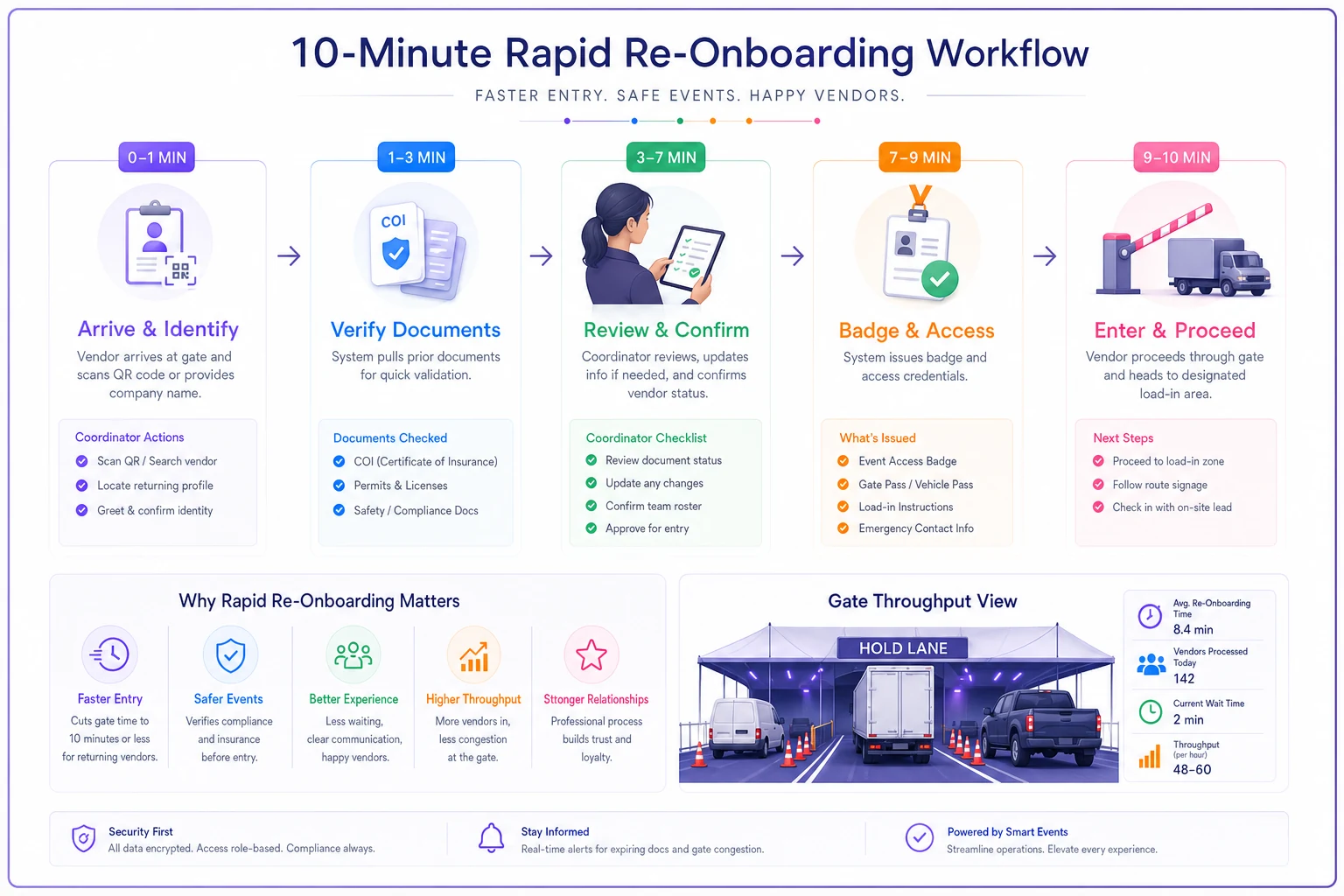
The discipline that makes this work: assume everything expired until proven current. The failure mode is treating "returning" as "still compliant." A vendor who's done your event five years running can walk up with lapsed insurance, and the familiarity makes staff less likely to check. Build the re-verify step so it can't be skipped out of goodwill.
This re-onboarding step is also where returning vendors connect back into your broader exhibitor operations and settlement workflows — the same record you re-verify at the gate should be tied to their contract milestones and on-site rules, so arrival, access, and accountability all reference one file.
A real scenario: a 140-vendor regional food & maker festival
A two-day regional festival ran roughly 140 vendors across food, makers, and sponsors. Their old process was email-based collection and a paper binder at the gate. On a typical load-in morning, average vendor check-in ran somewhere around 18–22 minutes once you counted document hunting and phone calls. The box-truck line at the main gate backed up past the lot by mid-morning, and two staff spent most of load-in just chasing missing COIs.
They rebuilt around a one-page packet with evidence templates, a mirrored gate checklist, a hold lane, and the ten-minute re-onboarding flow for their roughly 90 returning vendors.
The change wasn't dramatic in theory — mostly just discipline — but the results were noticeable. Returning vendors cleared in the 8–12 minute range because the only thing being verified was expired paperwork. First-timers dropped to around 12–15 minutes. A pre-event upload link meant that by load-in morning, close to 70% of evidence was already verified, so the gate was confirming rather than collecting. The box-truck backup that used to stretch past the lot cleared by the time the second gate shift came on. They also caught about a dozen vendors with lapsed or incorrect COIs before arrival — which was the real win, because those are the ones that turn into liability problems nobody notices until something goes wrong.
The qualitative shift mattered more than the time savings: staff stopped spending load-in on phone tag and could actually walk the footprint.
Where lightweight software helps (and where it doesn't)
You can run all of this on paper and a shared drive — plenty of events do. The one-pager, the templates, the checklists: none of it requires software. What software earns you is at the collection and verification layer, where the real time gets lost.
A vendor management or operational platform helps mainly by giving you one place where evidence gets uploaded, flagged valid or expired, and pulled up at the gate even on bad signal. When a platform auto-checks COI dates against the event date and flags the lapsed ones before arrival, you catch the problems during the quiet week instead of the chaotic morning. That's the difference between a process problem and a staffing problem.
Where it doesn't help: if your underlying requirements are vague, no tool fixes that. Software enforces a standard; it doesn't create one. Get the one-page packet and the evidence templates right first. The tooling just removes the manual re-checking on top.
When this setup makes sense: events with 40+ vendors, annual or recurring events with a meaningful returning base, and anything with compliance-heavy categories like food or alcohol where stale permits are a real liability.
When it's overkill: a 10-vendor community market where the coordinator knows everyone personally and can eyeball documents in a morning. The one-pager still helps; the full re-onboarding SOP is more structure than you need.
Pulling it together
Fast vendor check-in isn't a gate problem — it's a collection problem that becomes visible at the gate. The one-page packet forces the right evidence to exist early. The templates kill the "I sent something, just not the right thing" gap. The mirrored checklist makes the test identical on both sides. And the ten-minute re-onboarding flow handles your returning vendors without pretending last year's file still counts.
Build the single sheet, standardize the four evidence types, run the hold lane, and re-verify everything that expires. The line moves, the liability shrinks, and your load-in staff get to do their actual jobs instead of chasing certificates in a parking lot.
Fast vendor check-in isn't a gate problem — it's a collection problem that becomes visible at the gate. The one-page packet forces the right evidence to exist early. The templates kill the "I sent something, just not the right thing" gap. The mirrored checklist makes the test identical on both sides. And the ten-minute re-onboarding flow handles your returning vendors without pretending last year's file still counts.
Build the single sheet, standardize the four evidence types, run the hold lane, and re-verify everything that expires. The line moves, the liability shrinks, and your load-in staff get to do their actual jobs instead of chasing certificates in a parking lot.
Ready to elevate your event management?
Join 5,000+ event organizers using Festoly to save time, improve coordination, and deliver memorable experiences.