

The moment your credentialing system fails, everything downstream stalls. A media rep can't reach the press riser before the keynote. A vendor's forklift driver is stuck at the dock with nothing to prove clearance. A VIP with a $40k sponsorship walks up to a checkpoint staffed by a 19-year-old who has never heard the words "green tier access."
Most credentialing problems don't come from bad software or lazy staff. They come from a credential model that was never actually designed — it got assembled the week before the event out of colored lanyards and a shared spreadsheet nobody fully trusted. This piece is about the specific mechanics of a layered access system: when to stop issuing, how to staff the checkpoints that enforce it, what to do when the badge system goes dark, and the exact override language your on-site team needs when a legitimate person is standing in front of a locked zone.
Staying narrow on purpose here. This isn't about check-in throughput or station layout — that's a different problem. This is about the credential itself: the object, the tiers, the rules, and the failure modes.
The layered model most events actually need (and where it goes wrong)
A layered credential model means access is defined by tier, not by name. Instead of a list of who can go where, you build a small number of access classes and every badge maps to one. The mistake almost everyone makes is building too many tiers. Once you cross about six or seven access classes, your checkpoint staff can't hold the logic in their heads, and the whole thing collapses into "let them through if they look official."
| Tier | Who gets it | Zones | Issuance cut-off | Failover priority |
|---|---|---|---|---|
| All-Access (Ops) | Core staff, production, security leads | Everything incl. back-of-house | 48h before doors | Highest — manual pass always honored |
| Vendor/Exhibitor | Booth staff, load-in crews | Exhibit hall, docks, staff corridors | 24h before doors | High |
| Talent/Speaker | Presenters, green room guests | Stage, green room, general | 12h before doors | High |
| Press | Credentialed media | Press riser, general, mixed zones | Day-of, on approval | Medium |
| VIP/Sponsor | Sponsors, premium ticket holders | VIP lounge, general | Day-of | Medium |
| General | Standard attendees | General only | Day-of | Low — no manual override needed |
The tiers are the easy part. What breaks in real operations is the boundary between them. A speaker who is also a sponsor. A vendor whose CEO wants VIP lounge access on the second afternoon. These edge cases show up constantly, and if you haven't decided in advance who resolves them, they get resolved at the checkpoint by whoever is loudest.
The rule that actually works: one person owns tier exceptions, and their name is printed on the checkpoint sheet. Not a role. A name and a phone number. When a vendor argues at the gate, the staffer doesn't negotiate — they call the exception owner. That single decision removes most of the on-site friction, because the argument stops being with the person who can't say yes.
Issuance cut-offs: the deadline that prevents day-of chaos
An issuance cut-off is the point where you stop creating or modifying credentials. It sounds bureaucratic until you've watched a registration lead trying to print a new all-access badge for a "last-minute" contractor at 7:52 a.m. while forty attendees pile up behind him.
Eliminate event chaos with Festoly.
Manage every aspect of your event seamlessly — from planning to execution.
- Centralized event scheduling
- Real-time attendee tracking
- Vendor & resource coordination
No credit card required
The reason cut-offs matter isn't paperwork. It's that every credential issued after the cut-off skips the verification steps that made the earlier ones trustworthy. The 48-hour cut-off on all-access badges exists because that's the tier with the most power and the most abuse potential. You do not want someone talking their way into back-of-house access forty minutes before doors.
-
Tie the cut-off to the tier, not the event. High-access tiers close earliest. General closes latest. This is the opposite of how most events do it — one deadline for everything, which forces them to keep the dangerous tiers open too long.
-
Create a single, narrow post-cutoff path. There will always be genuine last-minute additions. Build one exception channel — the exception owner approves it, it gets logged, and it's flagged visibly (a stamped badge, a distinct color band). Everyone at the checkpoints should know: post-cutoff badges look different, and different means verify before honoring.
-
Freeze the data, not just the printing. A surprising number of teams stop printing badges but leave the underlying access list editable. Then someone quietly bumps a vendor to all-access at 6 a.m. and no one notices until they're standing in the production office. When you hit cut-off, lock write access to the credential records for everyone except the exception owner.
A realistic example: a regional trade show of around 2,800 attendees kept all tiers open until doors on day one. They processed something like 60–70 badge changes in the final ninety minutes — most legitimate, a handful not. Two people ended up in restricted areas who shouldn't have been. The next year they staged the cut-offs by tier and routed everything late through a single approver. Late changes dropped to roughly a dozen, all logged, none unauthorized. The registration desk stopped being a bottleneck because it stopped being the place decisions got made.
Staffing the checkpoints: rules that hold when it gets busy
Checkpoint staffing fails in a predictable way. You schedule enough people for steady flow, then a session lets out and 400 people hit a single access boundary at once. Under pressure, undertrained staff default to waving people through, because stopping the line feels worse than a possible breach.
The fix is staffing rules tied to what each checkpoint actually enforces, not a flat headcount.
-
Match staff seniority to tier sensitivity. The general-admission scan point can be your newest volunteer. The back-of-house door needs someone who will say no to a person wearing a production T-shirt and holding a clipboard. Sensitive boundaries get experienced staff, full stop.
-
Never staff a high-tier checkpoint solo. One person alone will eventually get talked past — not because they're weak, but because the social pressure of a confident, angry adult is real. Two people at a sensitive door means neither has to be the villain alone.
-
Give every checkpoint a written "hard no" list. Not what's allowed — what is never allowed regardless of story. "No general badges past this line, ever, no exceptions, call me instead." Positive rules invite interpretation. Negative rules don't.
-
Rotate the sensitive posts every couple hours. Decision fatigue at a high-access door is real. After three hours of standing there, people stop reading badges and start reading faces — which is exactly when mistakes happen.
The staffing-to-boundary mapping is really an extension of the broader coordination work in a modular operations playbook for multi‑day events — the same RACI thinking applies here. Someone is Responsible for the door, someone is Accountable for exceptions, and if those aren't distinct people, the door has no real backstop.
When lighter staffing actually makes sense
Not every boundary needs a fortress. If the "restricted" zone is a lounge with nothing behind it worth protecting, a single friendly checker is fine. Over-staffing low-risk boundaries pulls experienced people away from the doors that actually matter. Map your staffing intensity to what's genuinely at risk behind each line — a quiet sponsor lounge and a live power distribution area are not the same problem.
Badge failover: what happens when the system goes dark
This is the part most credentialing plans skip entirely, and it's the one that will actually ruin your morning. Your scanning app loses connectivity. The badge printer jams during load-in rush. The access database goes read-only at the worst possible moment. When any of these happen, you need a procedure that keeps legitimate people moving without opening the floodgates.
The core principle: failover should degrade gracefully, not fail open or fail closed. Fail-open means everyone gets through — a security problem. Fail-closed means nobody gets through — an operations disaster. You want a middle mode where trusted tiers keep moving on manual verification and lower-trust tiers pause briefly.
A failover workflow that holds up in practice:
-
The checkpoint lead announces "manual mode" over radio — a specific, named state, not a vague "we're having issues."
-
High-priority tiers (Ops, Vendor, Talent) are honored on physical badge inspection against a printed reference sheet. This is why every high tier gets a distinct, hard-to-fake physical marker — a specific lanyard color plus a stamp, not just a printed name.
-
Medium tiers (Press, VIP) are honored against a printed roster kept at each sensitive checkpoint. Yes, paper. It's slower, but it works when the network doesn't.
-
General admission pauses at a holding point if scanning is down — a short delay for the lowest-risk group is the acceptable trade.
-
Every manual entry gets a quick tally mark by tier so you can reconcile counts once systems return.
The printed reference sheets are the unglamorous hero here. A single laminated page at each checkpoint showing exactly what each valid tier's badge looks like — colors, markers, the current day's stamp — means your staff can verify without any technology at all. Print them fresh each morning if you're changing daily stamps.
This is where credentialing software earns its keep, quietly. A system that can export a clean per-checkpoint roster and generate distinct visual badge specs per tier means your failover paper is accurate and current, not a stale printout from three days ago. Some operational platforms built for event teams also keep a lightweight offline record on each device, so a checkpoint that loses connectivity can still validate the most recent synced list instead of going fully blind. That's the difference between "manual mode is annoying" and "manual mode is a crisis" — but the procedure has to exist on paper first. The software supports the plan; it doesn't replace it.
A quick visual of the manual-mode workflow helps checkpoint leads remember the steps.
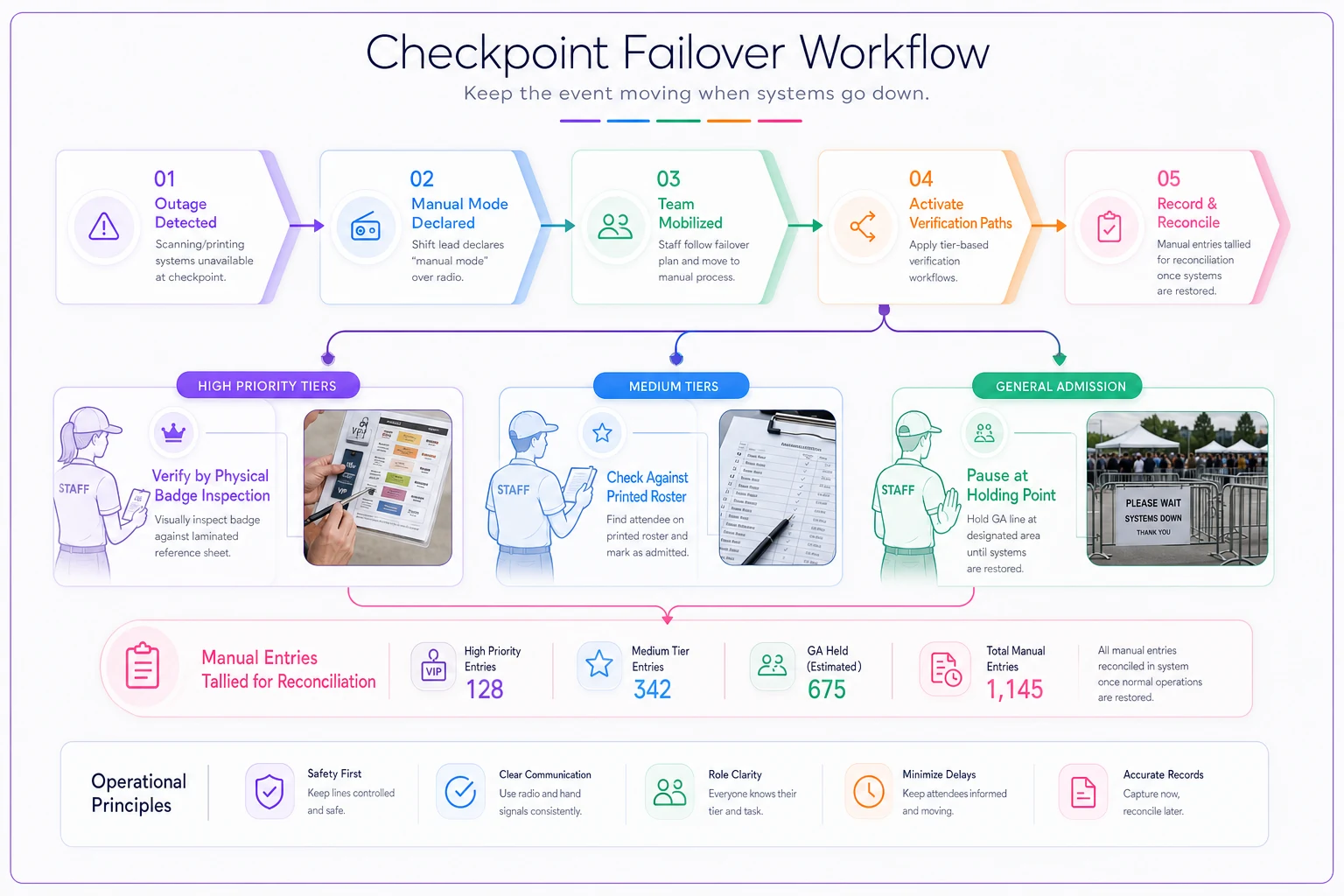
Keep the diagram small and place it on laminated sheets at each checkpoint.
Emergency override scripts for on-site teams
An override is different from failover. Failover is when the system breaks. An override is when the system is working fine but a real human needs access the rules don't currently grant — a medic who needs to cut through a restricted corridor, a sponsor's principal who arrived without their badge, a contractor called in to fix a failing rig.
Overrides are where all your careful tiering leaks. If any staffer can grant access on judgment, you don't have a credential system — you have a suggestion. So overrides need scripts: exact words, exact steps, exact logging.
Standard override script (non-emergency): > "I can't grant that access myself. I'm going to call [exception owner name] right now. If they approve it, I'll issue you a temporary marked pass and log it. That takes about two minutes."
Notice what this does. It never says no outright — which de-escalates — but it also never says yes. It routes to the one person authorized, and it produces a record. The temporary pass is visibly marked so downstream checkpoints know it was an exception.
Emergency override script (safety/medical): > "Go. I'm logging your badge or name and the time as you pass. Radio Control now."
For genuine emergencies, access wins and documentation follows. You never delay a medic to check a lanyard. But the moment they pass, someone logs it and notifies control so the breach is known and tracked, not silent.
The pattern across both: overrides are always logged, always routed, and always visibly marked. An unlogged override is a hole in your system you'll never be able to reconstruct afterward. When you're settling disputes with vendors or reviewing a security incident, that override log is the difference between "here's exactly what happened" and "we think somebody let someone in." The same discipline you'd apply to contract terms — spelling out exactly who can authorize what — belongs here too; it's the operational cousin of the clause-level thinking in vendor contract traps to avoid.
A short pre-event credentialing checklist
Run through this before doors open:
-
[ ] Tiers finalized at six or fewer, each with a distinct physical marker
-
[ ] Issuance cut-offs set per tier, earliest for highest access
-
[ ] Credential records locked to write-access except the exception owner at cut-off
-
[ ] Exception owner named, with phone number, printed on every checkpoint sheet
-
[ ] Sensitive checkpoints staffed with two experienced people, never solo
-
[ ] Every checkpoint has a written "hard no" list
-
[ ] Fresh per-checkpoint rosters printed for the current day
-
[ ] Laminated badge-reference sheet at each checkpoint showing valid tier markers
-
[ ] "Manual mode" failover procedure briefed to all checkpoint leads
-
[ ] Override scripts printed and rehearsed with on-site staff
-
[ ] Override log location confirmed and a person assigned to maintain it
Run through this before doors open:
A real scenario: the two-day conference that stopped guessing
A two-day industry conference — roughly 1,900 attendees, about 40 exhibitors, a dozen speakers — ran their first year on a single all-tier spreadsheet and colored wristbands. Day one, their scanning tablets dropped connection twice during morning rush. With no failover procedure, staff just started waving everyone through both times. By midday they had no reliable count of who was in restricted zones, and at least one non-exhibitor ended up in the load-in area near live rigging. Nobody got hurt, but it easily could have gone differently.
The second year they rebuilt it. Five tiers instead of the informal free-for-all. Staged cut-offs, with all-access frozen two days out. One named exception owner. Laminated badge sheets and printed rosters at the two sensitive doors. A rehearsed manual mode. Their tablets still glitched on day one of year two — same venue, same weak Wi-Fi. This time the checkpoint lead called manual mode over radio, staff verified high tiers against the laminated sheet and pulled the printed roster for press, and general admission held for maybe four minutes until connection came back. No unauthorized entries. The load-in door held. The registration desk processed a handful of genuine late additions through the exception channel, all logged. The organizer's post-event summary was basically: the thing that panicked them the year before became a non-event.
The thread that ties it together
A credential is only as strong as the moment it gets tested — and it gets tested when the network drops, when the line is 300 deep, and when a confident person insists they belong somewhere they don't. Everything above is designed for those moments, not the calm ones.
Small tier count so staff can hold it in their heads. Staged cut-offs so your most dangerous access closes first. Physical markers and paper rosters so failover doesn't mean chaos. Scripts so overrides are routed and recorded instead of improvised. These aren't complicated ideas — they're just the ones that tend to get skipped when the event is two weeks out and everyone's juggling six other things.
Good credentialing software makes all of this easier to prepare and reconcile, but the plan has to live on paper and in your team's heads before it lives in any system. Build the procedure first. Let the tools carry it.
A credential is only as strong as the moment it gets tested — and it gets tested when the network drops, when the line is 300 deep, and when a confident person insists they belong somewhere they don't. Everything above is designed for those moments, not the calm ones.
Small tier count so staff can hold it in their heads. Staged cut-offs so your most dangerous access closes first. Physical markers and paper rosters so failover doesn't mean chaos. Scripts so overrides are routed and recorded instead of improvised. These aren't complicated ideas — they're just the ones that tend to get skipped when the event is two weeks out and everyone's juggling six other things.
Good credentialing software makes all of this easier to prepare and reconcile, but the plan has to live on paper and in your team's heads before it lives in any system. Build the procedure first. Let the tools carry it.
Ready to elevate your event management?
Join 5,000+ event organizers using Festoly to save time, improve coordination, and deliver memorable experiences.