
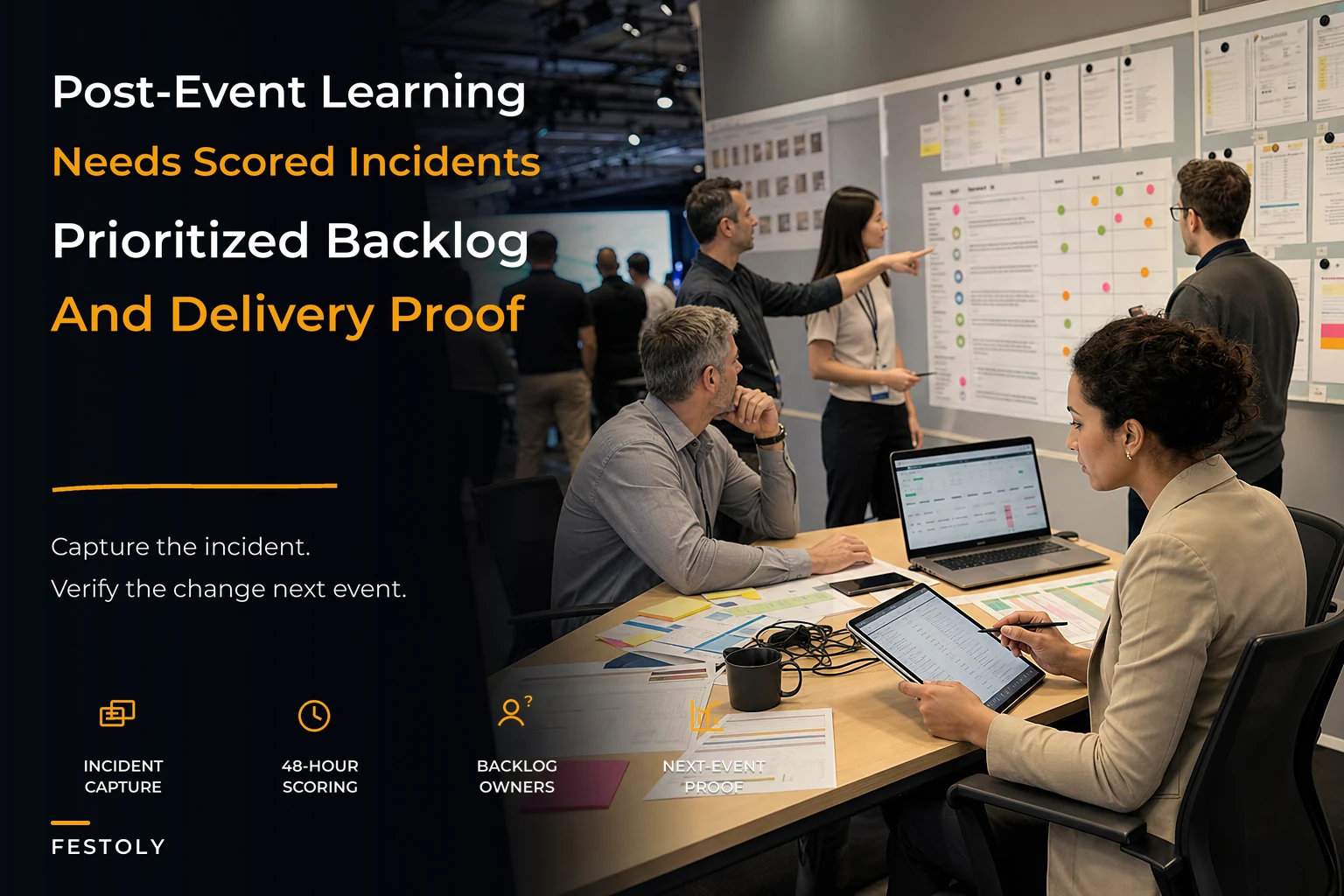

Most event teams are decent at surviving the event. They're terrible at learning from it.
The pattern is almost universal. The event ends, everyone's exhausted, there's a two-hour debrief where people vent about the vendor who showed up late and the WiFi that died during keynote. Someone takes notes in a Google Doc. The doc gets shared. And then nothing happens until three weeks before the next event, when somebody frantically searches for "that list of problems from last year" and finds half of it, misremembers the rest, and re-learns the same lessons the hard way.
This isn't a motivation problem. People want to fix things. The issue is there's no system connecting what breaks during the event to what actually changes before the next one. The improvement loop never closes. So the same incidents keep resurfacing — same badge printer jams, same catering timing gaps, same radio dead zones backstage — season after season.
What follows is a way to operationalize post-event continuous improvement so it behaves like an actual pipeline: incidents get captured consistently, scored by impact, ranked against each other, and assigned to someone with a date attached. Not a wishlist. A backlog with owners and delivery windows.
Why the debrief doc dies
The standard post-mortem fails for structural reasons, not because people are lazy.
First, capture happens too late and too vaguely. By the time the debrief meeting rolls around, the specifics have evaporated. "The check-in line got bad on Saturday morning" is useless. Was it 9:10am or 10:30am? Which door? How many stations were live? How long was the actual wait? Without the specifics, you can't diagnose the cause, and without the cause, any fix is a guess.
Second, everything gets treated as equally urgent. A debrief that lists 40 problems with no weighting is noise. The team fixates on whatever was most emotionally memorable — usually the loud, visible failure — while the quiet, expensive problems slip through. The vendor who yelled at the registration desk gets a whole action item. The 11% no-show rate that cost real sponsorship credibility gets a shrug.
Third, nothing has an owner or a date. "We should get better radios" is not a task. It's a sentiment. Tasks have a person responsible and a window they live in. Sentiments evaporate.
And fourth, the whole thing lives in a document nobody opens again. There's no backlog that carries forward. Each event starts the improvement process from zero, which means you're perpetually solving problems you already solved and then forgot.
The teams who actually get better aren't smarter — they just refuse to let the loop stay open. They treat every incident as an input to a system, not as a story to tell at the debrief.
Step one: capture incidents while they're still warm
The single highest-leverage change is moving capture from after the event to during it.
Eliminate event chaos with Festoly.
Manage every aspect of your event seamlessly — from planning to execution.
- Centralized event scheduling
- Real-time attendee tracking
- Vendor & resource coordination
No credit card required
You want a lightweight incident template that any staffer or team lead can fill in on their phone in under 90 seconds, in the moment or at the next lull. Not a formal report. A structured note. The goal is to grab the facts before they rot.
A usable incident capture template has these fields:
-
Timestamp — when it actually happened, not when you wrote it down
-
Location / zone — Gate B, main stage left, catering prep, etc.
-
Category — staffing, tech, vendor, crowd, safety, guest experience, finance
-
What happened — one or two factual sentences, no editorializing
-
Immediate impact — who/what was affected and how badly, right now
-
Workaround used — what you did on the spot (this is gold later)
-
Reported by — so you can follow up for detail
The "workaround used" field is the one most teams skip, and it's the most valuable. When the credential scanner froze and someone switched to a printed manifest and started checking people in manually, that workaround is a candidate for a permanent fix or at least a documented contingency. If you only capture the failure and not the response, you lose half the learning.
One practical note: standardize the categories before the event and make them a dropdown, not a free-text field. The moment categories become free text, you get "tech issue," "technology," "AV problem," and "sound thing" all describing the same class of incident, and your later analysis falls apart. This connects directly to how you handle event data governance — if the taxonomy isn't owned and consistent, nothing downstream is reliable.
Make the "workaround used" field required in your capture tool so teams actually record it.
The capture template alone — writing incidents down with timestamps while they're warm — prevents most of the "we forgot what went wrong" problem.
Step two: score impact so the loud problems don't win
Once you have raw incidents, you need a way to rank them that isn't based on who complained loudest.
-
Severity — how bad was the effect when it happened? (1 = minor annoyance, 5 = safety or major revenue/reputation hit)
-
Frequency / likelihood — was this a one-off fluke or something that'll recur every event? (1 = freak occurrence, 5 = structural, happens every time)
-
Spread — how many people or how much of the operation did it touch? (1 = isolated, 5 = affected the whole event)
Multiply or sum them — pick one and stay consistent. A severity-5, frequency-5, spread-4 incident is screaming for attention. A severity-4, frequency-1, spread-1 incident — the dramatic one-off — scores much lower, which is exactly right. It felt huge in the moment but it's not where your improvement energy should go.
Here's a scoring breakdown that shows why this matters:
| Incident | Severity | Frequency | Spread | Score | Gut-feel rank |
|---|---|---|---|---|---|
| Badge printer jams at peak check-in | 3 | 5 | 4 | 60 | "minor, we managed" |
| Angry vendor confrontation at registration | 4 | 1 | 1 | 4 | "huge deal" |
| Backstage radio dead zone | 3 | 4 | 3 | 36 | "annoying" |
| Catering service ran 25 min late | 2 | 4 | 5 | 40 | "whatever" |
| Keynote WiFi dropout | 5 | 2 | 4 | 40 | "disaster" |
Notice how the badge printer — which everyone shrugged off as "we managed" — scores highest, while the vendor confrontation that dominated the debrief conversation scores lowest. That inversion is the whole point. Gut feel over-weights drama and under-weights the recurring, structural stuff that quietly taxes every event you run.
Recurring medium-severity problems almost always cost you more over a year than the occasional dramatic one. A printer jam that adds 15 minutes to peak check-in at every event, compounded across six events, is a bigger real cost than a one-time shouting match. Scoring forces you to actually see that.
Step three: run it through a prioritization matrix
Scoring tells you what matters. Prioritization tells you what to do first, and that requires weighing impact against effort.
-
High impact, low effort — do these immediately. Second backup printer, pre-staged manifest, revised radio channel plan. Cheap, fast, high payoff.
-
High impact, high effort — these are real projects. They need budget, planning, maybe a vendor change. Schedule them deliberately with a proper delivery window.
-
Low impact, low effort — batch these and knock them out when you have slack. Don't let them crowd out the important work.
-
Low impact, high effort — park them. Most of these never get done, and that's fine.
The mistake teams make is treating the high-impact/high-effort bucket as optional. Those are usually the structural fixes — the ones that break the recurrence pattern permanently. Quick wins feel satisfying because you check boxes, but if you only ever do quick wins, you're applying band-aids to problems that need surgery. Each event you patch the printer situation; you never actually redesign the check-in flow that's causing the bottleneck in the first place.
A balanced cadence pulls from both: a handful of quick wins plus one or two structural projects per cycle. Trying to fix everything is how you fix nothing.
Step four: a change backlog with owners and delivery windows
This is where most improvement systems live or die. Prioritized items need to land in a persistent backlog — something that carries forward from event to event — with three non-negotiable fields on every item:
-
Owner — one named person, not a team. "Operations" owns nothing. Sarah owns this.
-
Delivery window — a date range anchored to the next event
-
Definition of done — what "fixed" actually looks like, so it can be verified
Anchoring delivery windows to the event calendar is what makes this real. If your next event is 14 weeks out, your backlog items get windows like "weeks 1–3," "weeks 4–8," and "weeks 9–12." Structural fixes get the early windows because they need lead time. Quick wins can live later. Anything without a window attached to a real event date will drift forever.
During the event → staff file incidents via the template in real time.
Within 48 hours → a single owner (the ops lead) deduplicates and scores every incident while memory is fresh.
Within one week → the team runs the prioritization matrix in a focused 60-minute session — not a two-hour vent, a decision meeting.
That same week → prioritized items become backlog entries with owners and delivery windows assigned.
Across the planning cycle → owners deliver against their windows, with a mid-cycle check-in to catch slippage.
At the next event → you track whether the fixed incidents actually stopped recurring.
Here's the workflow in practice.
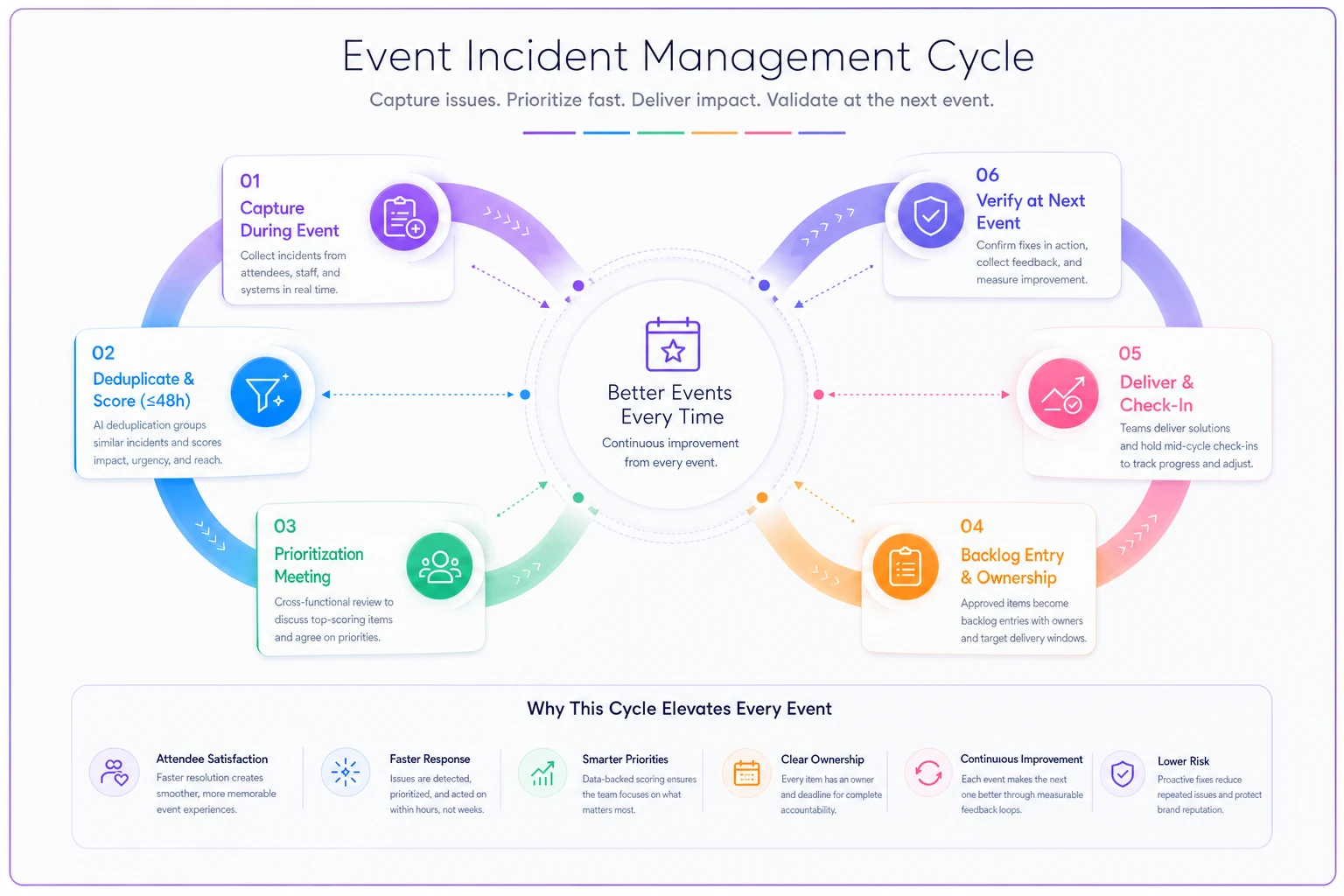
That last step is the one everybody forgets. Continuous improvement isn't continuous if you never verify the fix worked. If the badge printer fix was supposed to eliminate peak jams and you still logged three jams at the next event, that item goes back into the backlog — either the diagnosis was wrong or the fix was incomplete. The loop closing on itself is what separates a real improvement system from a to-do list.
Tracking which incidents recur also feeds straight into how you measure the operation overall. If you've built out a way of mapping event outcomes to metrics, your incident recurrence rate becomes one of the cleanest operational health signals you have — it tells you whether your improvement spend is actually buying you fewer problems.
A real scenario: regional trade show, 4,200 attendees
A regional B2B trade show, run twice a year, roughly 4,200 attendees and about 90 exhibitors. The team had a strong debrief culture — long meetings, detailed notes — but the same problems kept coming back. Check-in congestion on day one and exhibitor load-in overruns, year after year.
When they switched to real-time incident capture, something showed up that the debrief had always missed. The check-in congestion wasn't one problem — it was two separate incidents stacking. A badge-printing slowdown at two of the five stations, plus a surge of walk-up registrations the plan hadn't sized for. In the old debrief, these blurred into "registration was a mess on Saturday" and the fix each year was vaguely "add more staff," which never worked because staff wasn't the bottleneck.
With scored incidents, the printing issue came out high-impact/low-effort (swap to faster printers, pre-load badge stock) and the walk-up surge came out high-impact/high-effort (redesign the walk-up flow into a separate lane). Both got owners and windows. The printing fix landed in the first three weeks; the lane redesign got the full planning cycle.
Next event, peak check-in wait dropped from somewhere around 18–20 minutes down to under 7. Load-in overruns got the same treatment and shrank by more than half. Nothing dramatic or magical — they just stopped re-solving the same problems from scratch and started fixing root causes with dates attached. Over a year that's a meaningful chunk of staff hours and a noticeably smoother opening morning, which is the thing sponsors and exhibitors actually remember.
When this system makes sense — and when it's overkill
This isn't free. Capturing, scoring, and managing a backlog takes discipline, and for some events it's more machinery than you need.
When it's worth it:
-
You run the same or similar events repeatedly, so lessons compound
-
Your events are large or complex enough that problems recur and cost real money
-
You have multiple teams whose failures interact and need coordinated fixes
-
You're scaling up and can't afford to re-learn the same lessons at bigger stakes
When it's overkill:
-
One-off events you'll never repeat — capture lessons, sure, but a full backlog system is wasted effort
-
Very small events where the whole team fits in one room and nothing gets lost
-
Events where the operation is stable enough that incidents are genuinely rare
Even small teams benefit from the capture and scoring discipline, even if they skip the formal backlog. The capture template alone — writing incidents down with timestamps while they're warm — prevents most of the "we forgot what went wrong" problem. You can layer the rest on as you grow.
What changes as you scale
At small scale, the ops lead can hold the whole improvement loop in their head. One person files the incidents, scores them, and remembers to fix them. That works right up until it doesn't.
The breaking point usually arrives when you're running multiple events a year with different teams, or when the person who held all the institutional memory leaves. Suddenly the undocumented loop snaps. New team members have no idea the radio dead zone was "a known issue," so they rediscover it at the worst possible moment during a live show.
That's the real argument for making the backlog a persistent system rather than one person's memory. The point where teams reach for operational software to carry the incident log, scoring, and backlog isn't about fancy features — it's the moment the knowledge needs to outlive any single person and stay consistent across events. A shared backlog that automatically rolls unresolved and recurring items forward means nobody has to remember the lessons; the system remembers for them. Whether that's a purpose-built platform or a well-structured shared workspace matters less than the discipline of keeping the loop closed and the ownership clear.
The teams that get meaningfully better over time aren't the ones with the best debriefs. They're the ones who treat every incident as a tracked input — captured warm, scored honestly, prioritized against everything else, and assigned to a person with a date. That's the entire difference between an event operation that learns and one that just keeps surviving the same problems, event after event.
Ready to elevate your event management?
Join 5,000+ event organizers using Festoly to save time, improve coordination, and deliver memorable experiences.