

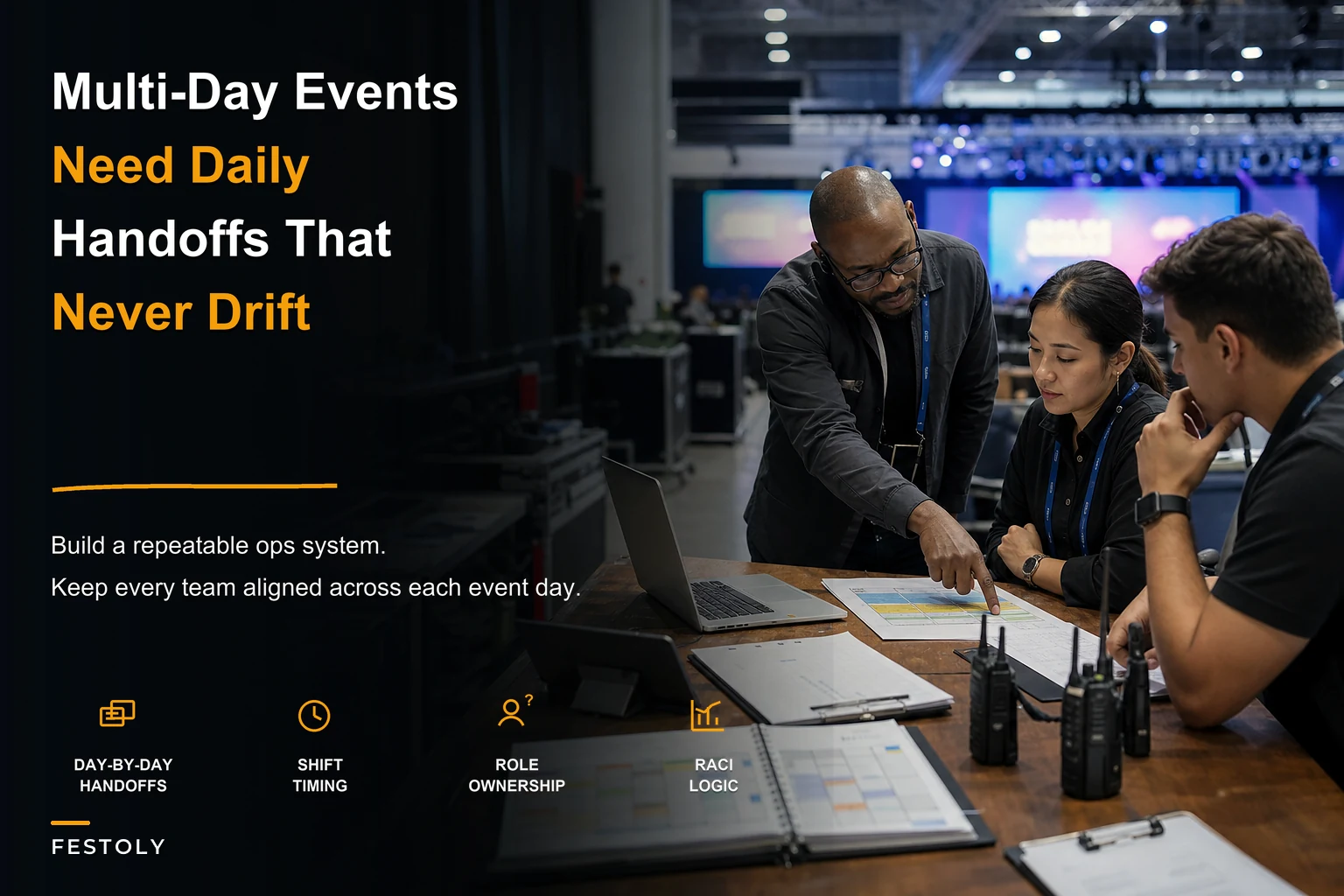

Day three of most conferences is when everything starts falling apart. The operations manager looks like death (because they haven't slept), registration can't figure out who's supposed to be checking people into breakout sessions, and nobody knows if the AV team heard about that speaker swap.
Multi-day event operations fail in predictable ways. Not because people mess up, but because running a conference for four days straight is completely different than managing a single-day summit. Handoffs pile up. Small miscommunications become massive problems. By day three, you're surviving on whatever the person who handled yesterday's crisis remembers.
I've watched operations teams scramble through way too many multi-day events. The ones that run smoothly on day four? They don't look anything like the events held together by exhausted coordinators and desperate group texts. It's not about having better people or bigger budgets. It's about building modular systems that expect things to go wrong and people to forget stuff.
Why Multi-Day Events Break Traditional Planning Models
Single-day events are sprints. You can power through them. Your registration person can handle every weird case because it's only eight hours. Your catering manager can personally check every dietary restriction because there's one dinner. Multi-day events are marathons where you're swapping runners mid-race.
The breakdown happens in stages. First, those informal handoffs that worked for your one-day events start creating gaps. The morning lead tells the afternoon person about the VIP who needs special badge access. By day two, that verbal handoff becomes "someone mentioned something about a badge?"
Second, role confusion multiplies. Day one, everyone knows Sarah handles speaker logistics. Day three, Sarah's fixing a catering disaster, Tom's covering her sessions, but the AV team keeps texting Sarah because nobody told them. Now you have speakers showing up to rooms with no microphones because Tom didn't inherit the pre-session tech check.
Third, institutional knowledge becomes a bottleneck. Mike figured out that registration system workaround on day one. Day three, Mike's rotating off, the new person doesn't know about the workaround, and you've got confused attendees in a line because the system is rejecting badges for sessions they definitely registered for.
Traditional event planning assumes continuity. Same team, same energy, same focus from setup to breakdown. Multi-day events don't have continuity. They have shifts, rotations, and people who occasionally need sleep.
Building RACI Charts That Actually Get Used
Most event RACI charts are useless. Massive spreadsheets with neat little R's and A's and C's that nobody looks at after the planning meeting. Registration needs to process a refund? Let me check this 47-row spreadsheet to figure out if I'm Responsible or just Informed.
Eliminate event chaos with Festoly.
Manage every aspect of your event seamlessly — from planning to execution.
- Centralized event scheduling
- Real-time attendee tracking
- Vendor & resource coordination
No credit card required
RACI charts for multi-day events need to be scannable in ten seconds while someone's asking you a question and three other things are happening.
Start with decision types, not tasks. Instead of "process refund," create a category called "Financial Decisions Under $500" and assign it. Your staff doesn't need to check if refunds are specifically listed. Any money decision under $500 goes to a specific role.
Core Decision Categories:
-
Attendee exceptions (badge issues, access requests, special needs)
-
Vendor changes (timing, deliveries, substitutions)
-
Program modifications (speaker changes, room swaps, schedule shifts)
-
Financial decisions (under $500, $500-2000, over $2000)
-
Safety and compliance (medical, security, facility)
-
Customer recovery (complaints, problems, make-goods)
For each category, track three things per shift: Who decides (Accountable), Who executes (Responsible), Who must know immediately (Consulted). Skip Informed. In live events, information flows naturally or not at all.
The chart lives on one page, posted at every key station. Not in a binder. Not in an app. Physical, visible, simple enough for someone to photograph with their phone.
What makes it work: rebuild the RACI for each day. Day one has Sarah accountable for speaker logistics. Day two shows Tom in that role. The chart at each station shows TODAY'S responsibilities, not the master plan.
Day-by-Day Handoff Protocols
Handoffs are where multi-day events succeed or die. Not the planning, not the setup—the fifteen minutes where day shift explains to night shift what's actually happening versus what was supposed to happen.
Most handoffs are verbal brain dumps. "VIP in room 203 complained about noise, printer at registration is weird, we're low on large t-shirts." By day three, half this information is lost, distorted, or sitting in someone's notes who isn't even working.
The Three-Document System:
Document 1: The Continuation Log
-
A living Google Doc tracking open issues across shifts. Not a task list—a status tracker for anything spanning multiple shifts. Each entry has:
-
- Issue description
-
- Current status
-
- Next action needed
-
- Owner for next shift
-
- Critical deadline (if any)
Person ending shift updates statuses. Person starting shift reviews and accepts ownership. Four minutes to update, two to review.
Document 2: The Exception Report
Simple form capturing any deviation from run-of-show. Not every little thing—stuff affecting operations. Speaker 30 minutes late? Exception report. Had to move lunch because of kitchen delay? Exception report. These compound across days, and documenting them prevents the same problem surprising every shift.
Document 3: The Number Sheet
-
Key metrics from that shift
actual attendance at major sessions, meal counts served, registration issues logged, vendor concerns.
-
Not for reporting—for pattern recognition. When Thursday's breakfast has 30% lower attendance than Wednesday's, Friday's team can adjust before they're stuck with 200 extra meals.
The Handoff Meeting Structure:
Fifteen minutes. Always. Even on day one when everything seems important.
First 5 minutes: Previous shift walks through the Continuation Log. Only open issues, only what needs action.
Next 5 minutes: Review exceptions. Not to solve them, just awareness. "Heads up, keynote speaker wants to add Q&A that wasn't planned, so sessions might run long."
Last 5 minutes: Incoming shift confirms ownership of open issues and asks questions. No problem-solving, no brainstorming. Just information transfer.
Outgoing shift leader stays on-call for two hours after handoff. Not on-site, but reachable if something doesn't make sense. After two hours, they're completely off.
Four minutes to update, two to review.
Here's a quick visual of the handoff workflow for the team to reference during busy transitions.
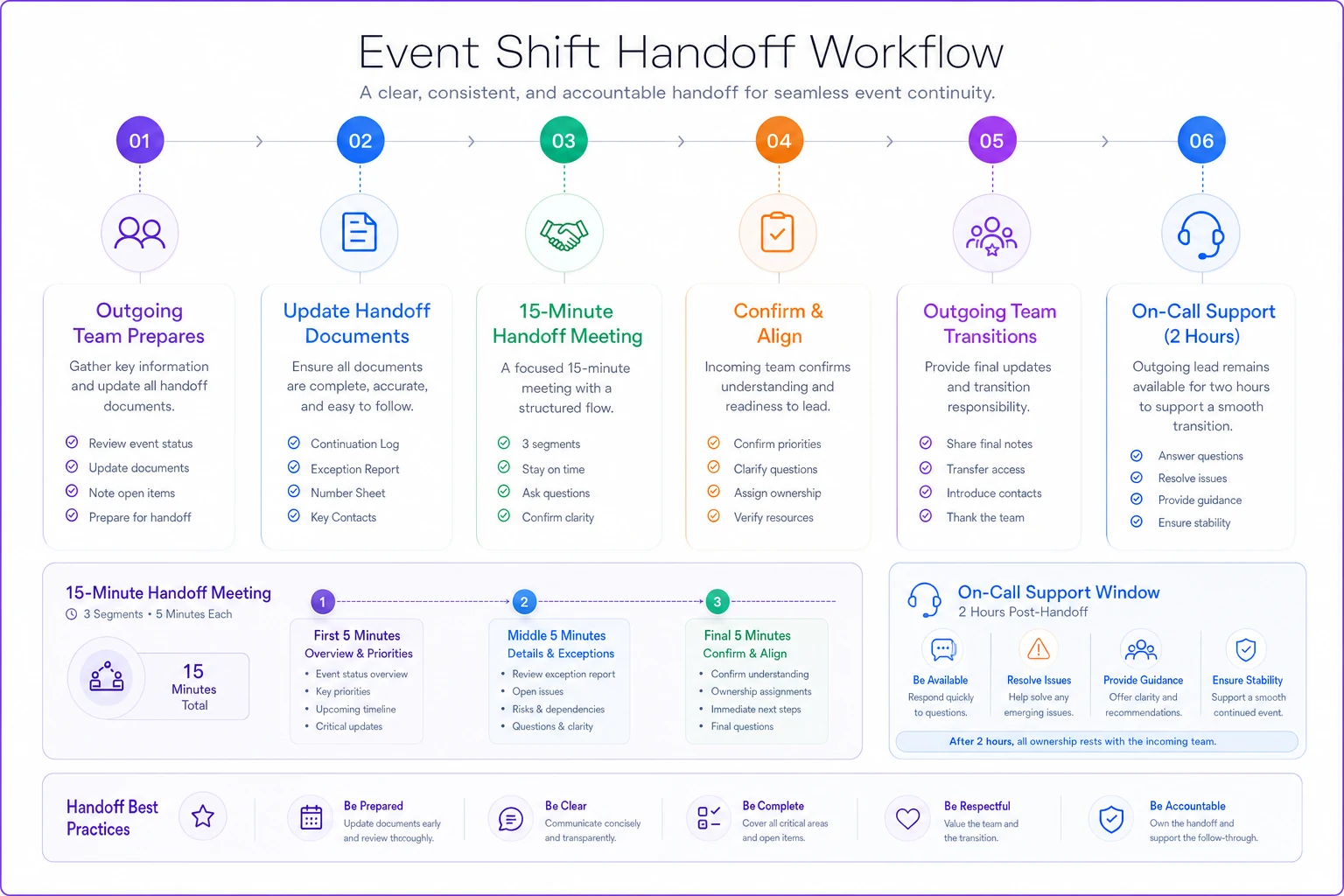
Keep this graphic simple so teams can internalize the flow without reading a lot of text.
Pre-Event, Live Event, and Post-Day Checklists
Checklists for multi-day events aren't about making sure things get done. They're about consistency when different people do them each day.
| Checklist Type |
|---|
| Pre-Event Checklists (Night Before Each Day) |
| Live Event Checklists (Every 4 Hours) |
| Post-Day Checklists (End of Each Day) |
Pre-Event Checklists (Night Before Each Day):
-
Run at 8 PM the night before each event day. Same checklist, every night.
-
Room Reset Verification
-
- Signage matches tomorrow's schedule
-
- AV equipment tested in each room
-
- Supplies restocked (notepads, pens, water)
-
- Temperature settings confirmed
-
- Backup equipment locations verified
Vendor Confirmations:
-
- Next day arrival times reconfirmed
-
- Special requests from today forwarded
-
- Delivery locations clarified
-
- Contact numbers still working
-
- Payment issues flagged
Staff Assignments:
-
- Tomorrow's RACI chart posted
-
- Shift schedules confirmed via text
-
- Backup contacts identified for each role
-
- Special instructions documented
-
- Uniform/credential requirements communicated
Live Event Checklists (Every 4 Hours):
Run at 8 AM, 12 PM, 4 PM, and 8 PM during event days. Quick sweeps to catch issues before they cascade.
Operations Sweep:
-
- Registration desk stock levels
-
- Bathroom supplies status
-
- Signage properly placed
-
- Technology functioning in active rooms
-
- Vendor stations operating normally
-
- Attendee flow bottlenecks identified
Communication Check:
-
- Team radios/phones functioning
-
- Key stakeholders reachable
-
- Emergency contacts verified
-
- Vendor liaisons responsive
-
- Speaker support confirmed for next block
Attendee Temperature:
-
- Line lengths at key points
-
- Complaint patterns identified
-
- Social media sentiment scanned
-
- Energy levels in sessions
-
- Catering satisfaction observed
Post-Day Checklists (End of Each Day):
Create foundation for tomorrow's operations.
Closure Protocol:
-
- Rooms secured and locked
-
- Equipment powered down
-
- Lost and found processed
-
- Vendor areas checked
-
- Sensitive materials secured
Reset Planning:
-
- Tomorrow's changes identified
-
- Overnight work scheduled
-
- Early morning needs flagged
-
- Special setups confirmed
-
- First shift requirements documented
Issue Documentation:
-
- Day's exceptions logged
-
- Patterns identified
-
- Preventable issues noted
-
- Success moments captured
-
- Improvement ideas recorded
Create foundation for tomorrow's operations.
The Testing Protocol Most Events Skip
What separates smooth multi-day events from chaotic ones: they test the handoffs and transitions, not just the main show.
Two weeks before, run a tabletop simulation. Not of the event—of operational transitions. Give your day-one team realistic problems: registration system crashes for 20 minutes, keynote speaker is sick, catering delivers 50 fewer lunches. Now simulate the handoff to day-two team. What information gets lost? What assumptions cause problems?
Simulation reveals system gaps. Maybe your continuation log doesn't have a field for "attempted solutions that didn't work," so next shift repeats failed fixes. Maybe your RACI chart assigns financial decisions to someone not on-site during certain hours. You catch this before going live.
During the event, designate a systems observer. Not someone managing operations—someone watching how systems work. They track: Which checklists get completed? Which parts get skipped? Where do handoffs break down? What information moves outside official channels?
This isn't about compliance or catching mistakes. It's understanding how your systems perform under real conditions. That perfect RACI chart might be beautiful in theory, but if everyone's just texting the operations manager anyway, you need to know.
Common Failure Points in Multi-Day Operations
The Day 2 Energy Drop: Your team crushed day one. Everything went perfectly. Day two hits and response times slow down, small issues don't get caught, nobody has the same urgency. Build in energy management: shorter shifts on day two, different team members taking point, breaks that actually happen.
The Assumption Cascade: Day one establishes patterns. Vendor showed up 30 minutes early? By day three, everyone assumes they'll always be early, so nobody confirms arrival time. They show up on time (not early) and breakfast service scrambles. Every operational assumption needs daily verification.
The Knowledge Hoarding: Your best operations person knows everything. They've handled every crisis, memorized every workaround, become the unofficial information hub. When they rotate off or burn out, operations crumble. Force knowledge distribution through handoff protocols. If information isn't in the continuation log, it doesn't exist.
The System Drift: Morning team modifies the checklist because one item doesn't apply to their shift. Afternoon team uses different communication because it's faster. By day three, you're not running one system—you're running four interpretations of a system. Daily system resets matter more than perfect systems.
Building Modular Playbooks for Different Event Types
Modular operations let you swap components based on event type without rebuilding everything.
Tech conferences need different RACI categories than music festivals. Tech conferences might have "Demo booth failures" and "WiFi capacity issues." Music festivals have "Artist requests" and "Weather response." But the RACI structure—decision categories, clear ownership, daily rebuilds—stays the same.
-
For Trade Shows
Extend continuation log to track booth-specific issues across days. Add vendor liaison checklist running every two hours. Include exhibitor move-in/move-out in handoff protocols since different teams handle each day.
-
For Corporate Meetings
Tighten exception reporting to include anything affecting executives or board members. Add confidentiality layer to handoffs—some information can't go in shared documents. Build redundancy around presentation technology since one failed investor pitch tanks the entire event.
-
For Festivals
Expand handoff window to 30 minutes because you're covering more ground. Add weather contingency ownership to every shift's RACI. Include crowd flow patterns in hourly sweeps since density issues compound across days.
-
For Sporting Events
Build separate playbooks for practice versus competition days. Add medical/safety as primary RACI category with clear escalation paths. Include athlete services in every checklist since small issues become huge problems across multiple competition days.
Modular operations let you swap components based on event type without rebuilding everything.
When AI-Powered Operations Actually Help
Most multi-day event operations run on spreadsheets, radio calls, and whatever Sarah remembers from yesterday. Works until Sarah's off shift and the spreadsheet hasn't been updated since noon on day one.
AI-powered operational software changes this—not by replacing human judgment, but by maintaining operational memory across shifts and days. Instead of manually updating that continuation log, issues flow automatically from your ticketing system, vendor communications, and team reports into a central platform. Night shift sees every issue day shift handled, what worked, what didn't, without relying on hurried handoff conversations.
The real value is pattern recognition. When the same vendor issue appears across multiple days, when registration bottlenecks happen at predictable times, when certain rooms consistently have AV problems—AI automation surfaces these patterns before they become day-four crises. Your operations team stops firefighting the same problems repeatedly and starts preventing them.
Smart task routing means the right person gets notified based on current shift assignments, not outdated contact sheets. When roles change between days, the system knows. When someone calls in sick, backup automatically inherits their decision authorities. No more tracking down who's actually responsible for approving that last-minute catering change on day three.
The biggest impact? Reducing cognitive load on your operations team. They're not trying to remember if someone already handled that speaker request, whether the vendor confirmed tomorrow's delivery time, or which schedule version is current. The system maintains institutional knowledge, so your team can focus on actually running the event instead of managing information about running the event.
Making Systems Stick When Everything's on Fire
Most operational playbooks assume perfect conditions. Everyone follows checklists. Everyone attends handoffs. Everyone updates documents. Then day two hits, three things are on fire, and your beautiful systems get abandoned for crisis mode.
Systems that survive multi-day events are built for degraded conditions. They assume people will miss handoffs, skip checklist items, forget to update documents. They still work anyway.
Build in catches. If someone misses handoff meeting, continuation log is their safety net. If someone skips checklist item, next sweep catches it. If RACI chart isn't clear, escalation default is obvious. Your systems should degrade gracefully, not catastrophically.
Make systems easier than not using them. If updating continuation log takes 30 seconds but finding yesterday's shift lead takes 10 minutes, people will update the log. If checking RACI chart is faster than guessing who to call, they'll check the chart. Path of least resistance should run through your systems, not around them.
Multi-day event operations are about maintaining consistency when everything wants to fall apart. Not consistency of doing everything perfectly, but handling problems the same way whether it's hour 8 or hour 80 of your event.
The playbooks, RACI charts, and checklists aren't about control—they create predictable ways for unpredictable things to get handled. When your registration system crashes on day three, you want the response to be as smooth as day one, even though completely different people are handling it.
Every multi-day event teaches you something about operations. Smooth ones teach you what works. Chaotic ones teach you where systems break. Both are valuable if you're capturing those lessons in playbooks instead of hoping next time will be different.
Your operations team already knows how to handle problems. What they need is a system helping them handle the same problem consistently across four days, three shifts, and two dozen handoffs. That's what modular operations give you—not perfect events, but predictably manageable ones where day four runs as smoothly as day one, just with different people making it happen.
Ready to elevate your event management?
Join 5,000+ event organizers using Festoly to save time, improve coordination, and deliver memorable experiences.