


Most venue software failures don't show up in the demo. They show up eight months later, when your events coordinator is still copying deposit amounts into a spreadsheet because the system can't handle a payment schedule, or when two staff double-book the same ballroom because the resource calendar treats "the Grand Hall" and "the Grand Hall with the partition open" as the same bookable unit.
Venues are a strange category to buy software for. The tools that market themselves as "event management platforms" are usually built for the organizer putting on the event — ticketing, registration, attendee flow. What a venue operator needs is almost the opposite: you're managing the building, the rooms, the contracts, the deposits, and twelve different clients who all want Saturday in June. If you're running festivals or large public events, the overlap in calendar and ticketing tooling is real, and that's covered well in this breakdown of event management software categories for 5–20k festivals. This guide stays on the operator side of the fence: the people who own or run the space.
Here's what actually separates venue software from generic event tools, and how to evaluate it without getting burned.
The capabilities that are actually unique to venues
Plenty of software can hold a calendar. Very little of it handles the way venues actually get booked and billed. These are the four areas where generic tools fall apart.
Resource scheduling (not just room booking)
The mistake buyers make here is assuming a room calendar is enough. It isn't. A real venue has nested and shared resources: a main hall that splits into three breakout rooms, a shared kitchen that serves two event spaces, AV equipment that lives in one place but travels, and staff who can't be in two rooms at once.
The feature that matters is resource dependency logic. When someone books the full ballroom, the system should automatically block the two half-rooms it's made of. When the shared catering kitchen is committed to a wedding, the adjacent conference room's food service should flag a conflict. A conference center we looked at was losing roughly 6–8 hours a week of coordinator time just manually cross-checking which breakouts were "really" available because their calendar treated every space as independent.
Ask vendors directly: Can a single bookable space block or release other spaces automatically? If the answer involves "well, you'd set up a note to remind staff," that's a no.
Contracts, deposits, and payment schedules
This is where venue billing diverges hardest from event ticketing. A wedding client doesn't pay once. They put down a deposit to hold the date, pay an installment at the six-month mark, settle the balance two weeks out, and leave a damage deposit that gets refunded — or partially kept — after the event. That's four or five distinct financial events tied to one booking, each with its own due date and its own consequence if missed.
Generic systems model this as "an invoice." Venue-grade systems model it as a payment schedule attached to a contract, with automated reminders and a clear view of what's outstanding across every booking on the calendar.
The money leaks at most venues aren't dramatic — they're the slow kind. A missed deposit reminder here, a damage deposit nobody circled back on there. Over a year a mid-size wedding venue can quietly lose a few thousand dollars just in deposits that were never chased or never returned, which eventually turns into chargebacks and angry reviews.
Floorplan and seat mapping
For theaters and sports facilities, seat mapping is non-negotiable — and it has to be the actual seating chart, with accessible seats, obstructed views, and holds for house/comp seats. For wedding and conference venues, the equivalent is layout configuration: the same room sells as a 200-person banquet, a 300-person theater-style session, or a 120-person rounds-with-dance-floor setup, and each configuration changes capacity, setup time, and sometimes price.
The buyer trap: demos show you a pretty drag-and-drop floorplan editor, and you assume it connects to everything else. Often it doesn't. The question isn't "can I draw a layout" — it's "does the chosen layout drive the capacity number the system enforces, the setup/teardown buffer it books, and the price it quotes?" A floorplan tool that's just a drawing with no logic behind it is decoration.
Capacity and compliance enforcement
Capacity isn't one number. It's fire-code occupancy, it's the configured layout's practical limit, and sometimes it's a permit or licensing cap that's lower than both. Community centers and sports facilities especially get caught here, because the same gym has a different legal capacity for a seated banquet versus a standing concert versus a basketball game with bleachers out.
Good venue software lets you set capacity per configuration and warns you before a booking exceeds it. The ones that matter also track compliance artifacts: insurance certificates from renters, required permits, security staffing ratios tied to headcount. When a client books a 400-person event and your permit tops out at 350, you want the software to catch it at booking — not the fire marshal to catch it at 8pm on event night.
A quick comparison: what "venue-ready" looks like vs. generic event tools
Most venues shopping for software end up comparing tools that look identical on a feature list but behave completely differently in practice. The table below cuts through that. These aren't edge cases — they're the core differences that show up in day-to-day operation within the first few months of going live.
Eliminate event chaos with Festoly.
Manage every aspect of your event seamlessly — from planning to execution.
- Centralized event scheduling
- Real-time attendee tracking
- Vendor & resource coordination
No credit card required
| Capability | Generic event/ticketing tool | Venue-grade operational software |
|---|---|---|
| Room scheduling | Single flat calendar | Nested/shared resources with dependency blocking |
| Payments | One-time or simple invoice | Multi-stage deposits + schedules + damage deposits |
| Layouts | Static image upload | Configurations that drive capacity, buffers, and price |
| Capacity | One max number | Per-configuration limits + compliance caps |
| Contracts | Add-on or none | Built-in with e-sign, versioning, deposit tracking |
| Setup/teardown | Not modeled | Buffer time auto-booked around events |
The buffer row is the one people overlook most. A space isn't free the minute an event ends — it needs teardown, cleaning, and reset. If the software lets the next client book the slot immediately after the last one, you'll end up with a crew still breaking down chairs while the next party arrives at the door. That scenario is more common than it should be, and it's entirely preventable if the platform actually models turnaround time as a real constraint.
Integration and migration: the part that quietly decides everything
Software selection usually lives or dies on two unglamorous things: whether it connects to what you already run, and whether you can move your existing bookings into it without a disaster.
Integration checklist
-
Accounting (QuickBooks, Xero, or similar) — so deposits and final payments reconcile without re-keying
-
Payment processing — and importantly, who owns the merchant relationship and what the per-transaction cost is
-
Calendar sync (Google/Outlook) — two-way, so staff aren't flipping between systems
-
Website/booking widget — for inquiry capture or self-serve holds, if that's your model
-
Email/CRM — so inquiry-to-contract follow-up doesn't live in someone's personal inbox
-
Document e-signature — native or via DocuSign-type integration
The integration that gets skipped most often is accounting, and it's the one that costs the most in hidden labor. When bookings and payments don't flow into your books automatically, someone is retyping numbers monthly — and retyped numbers are wrong numbers.
Migration checklist
-
Export your current data — every forward booking, contract, deposit balance, and client record. Confirm the format the new vendor accepts.
-
Map your spaces and configurations first — set up the building's structure before importing a single booking.
-
Import future-dated bookings, not history — you rarely need five years of past events in the new system; you need everything on the forward calendar to be correct.
-
Reconcile outstanding deposits by hand — this is the one thing worth checking line by line. A wrong deposit balance after migration becomes a fight with a client.
-
Run both systems in parallel for 2–4 weeks — enter new bookings in both until you trust the new one.
-
Set a hard cutover date and communicate it to every staff member who touches the calendar.
The parallel-run step is where people get impatient and skip it. Don't.
Here's a simple migration workflow.
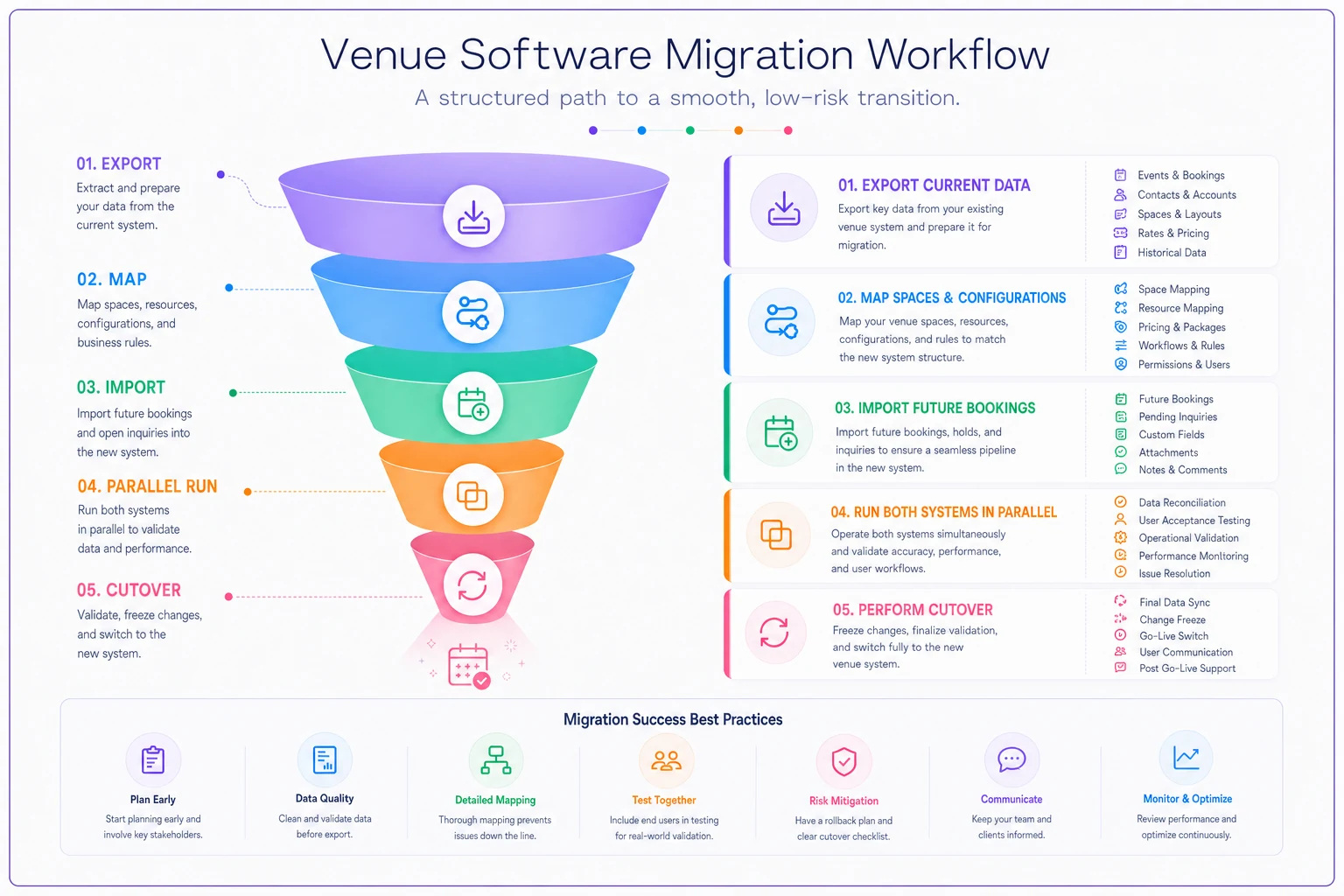
The parallel-run step is where people get impatient and skip it. Don't. A venue that cut over cold lost visibility on three already-booked events that didn't migrate cleanly, and found out when the clients called to confirm details nobody had.
Pricing models and how to not overpay
Flat monthly/annual subscription — predictable, usually tiered by number of spaces or users. Best for steady operators who want to know their cost.
Per-booking or per-event fees — can look cheap until you're high-volume. A community center doing 40+ rentals a month can get hurt here.
Percentage of transactions — common when the platform processes your payments. Watch this closely. A 2–3% cut on top of standard card fees on a venue that moves six figures in deposits and payments adds up fast. This can quietly become your largest software cost while looking like a small number on the pricing page.
Setup/implementation fees — one-time, sometimes negotiable, sometimes padded. For a multi-space venue with complex configurations, some implementation cost is legitimate.
A practical move: ask every vendor to quote your total annual cost at your actual volume, including transaction cuts, not the headline monthly number. Two platforms that both say "$199/month" can be thousands of dollars apart once you run your real booking and payment volume through them.
KPIs worth tracking once you're live
Software is only worth it if it tells you something you couldn't see before. These are the metrics that actually change decisions:
-
Utilization rate per space — what % of available bookable hours are actually sold. This is the number that tells you whether to adjust pricing or chase more inquiries.
-
Inquiry-to-booking conversion — how many requests turn into signed contracts. Drops here usually mean slow follow-up, not weak demand.
-
Average deposit-to-payment lag — how long clients take to complete payment schedules. Rising lag is an early warning on cash flow.
-
Lead time — how far in advance spaces book. Shrinking lead time changes how you staff and market.
-
Rebooking/repeat client rate — especially for corporate and community clients, cheaper than acquiring new ones.
Utilization is the one most operators underweight. A wedding venue obsessing over booking more Saturdays while leaving Thursdays and Sundays nearly empty is leaving the easiest revenue on the table — and you only see that clearly when the software reports hours-sold against hours-available per space.
An RFP / feature checklist you can hand to vendors
Drop this into your vendor conversations and make them answer yes/no, then show you. "Show me" catches a lot that "yes" misses.
Scheduling
-
[ ] Nested/shared resource blocking
-
[ ] Auto-booked setup/teardown buffers
-
[ ] Staff and equipment assignment per booking
-
[ ] Conflict warnings before confirmation
Contracts & payments
-
[ ] Multi-stage deposit/payment schedules
-
[ ] Damage deposit tracking and refund handling
-
[ ] Native or integrated e-signature
-
[ ] Automated payment reminders
Layouts & capacity
-
[ ] Multiple configurations per space
-
[ ] Capacity enforced per configuration
-
[ ] Compliance/permit caps and document tracking
-
[ ] Seat mapping (if a theater or ticketed-seating venue)
Integration & admin
-
[ ] Accounting sync
-
[ ] Calendar two-way sync
-
[ ] Role-based permissions
-
[ ] Data export (so you're never trapped)
That last box — clean data export — is the quiet one that protects you. If leaving the platform means losing your booking history, you don't own your data, the vendor does.
Suggested vendor categories by venue type and size
You don't need "the best" software — you need the one built for your shape of venue. Rough guidance:
-
Theaters and performing-arts spaces — prioritize true seat mapping, holds/comps, and box-office/ticketing depth. These overlap most with event ticketing platforms.
-
Wedding and private-event venues — contract and deposit handling is king, plus inquiry CRM and configurable layouts. Volume is lower, value per booking is high, so follow-up tooling matters.
-
Conference centers — nested resource scheduling and AV/catering coordination dominate. Multiple concurrent rooms and shared services are your hard problem.
-
Community centers — high-volume, lower-value rentals mean per-booking pricing can hurt; look for simple recurring-booking support and easy member/public self-serve.
-
Sports facilities — recurring league scheduling, variable capacity by event type, and often a membership or team-billing layer.
Size cuts across all of this: a single-space operator shouldn't buy enterprise-tier complexity, and a multi-building operation shouldn't try to run everything on a tool designed for one room. Match the software's center of gravity to yours.
A short real scenario
A mid-size conference center — three main spaces that subdivide into nine bookable rooms, plus a shared kitchen — was running everything off a shared calendar and a stack of Word-doc contracts. Two problems kept recurring: breakout rooms got double-booked because the calendar didn't understand the rooms were made of each other, and deposits slipped because reminders depended on someone remembering.
Their coordinator was spending close to a full day each week just cross-checking availability and chasing payments. Double-bookings were landing maybe once or twice a month — each one an awkward call and sometimes a discounted apology.
After moving to a platform with proper nested-resource scheduling and payment schedules tied to contracts, the double-bookings essentially stopped. The system wouldn't let the conflict happen. Deposit follow-up went automatic. The coordinator got back somewhere around 5–6 hours a week, and the quiet deposit leakage they'd never bothered to quantify turned into money that actually showed up.
Nothing dramatic. No transformation story. Just a building that stopped tripping over its own calendar.
When this kind of software makes sense — and when it doesn't
It makes sense when you're running multiple bookable spaces, handling staged payments, or spending real staff hours coordinating availability and chasing deposits. The moment double-bookings or missed deposits start costing money, dedicated venue software pays for itself quickly.
It's a bad idea when you run a single simple space with occasional rentals and a one-time flat payment. A shared calendar and a payment link genuinely might be enough, and paying for configuration logic you'll never use is just overhead.
Who should slow down: operators who are mid-growth and about to add spaces or staff. The worst time to pick is right before a change, because you'll choose based on today's shape and outgrow it in a year. If expansion is coming, buy for where you'll be, not where you are.
The core thing to remember: event tools are built for the person throwing the event, and venue tools are built for the person who owns the room. They look similar in a demo and feel completely different eight months in. Buy for the way your building actually gets booked, billed, and configured — and make every vendor show you, not just tell you.
Ready to elevate your event management?
Join 5,000+ event organizers using Festoly to save time, improve coordination, and deliver memorable experiences.