

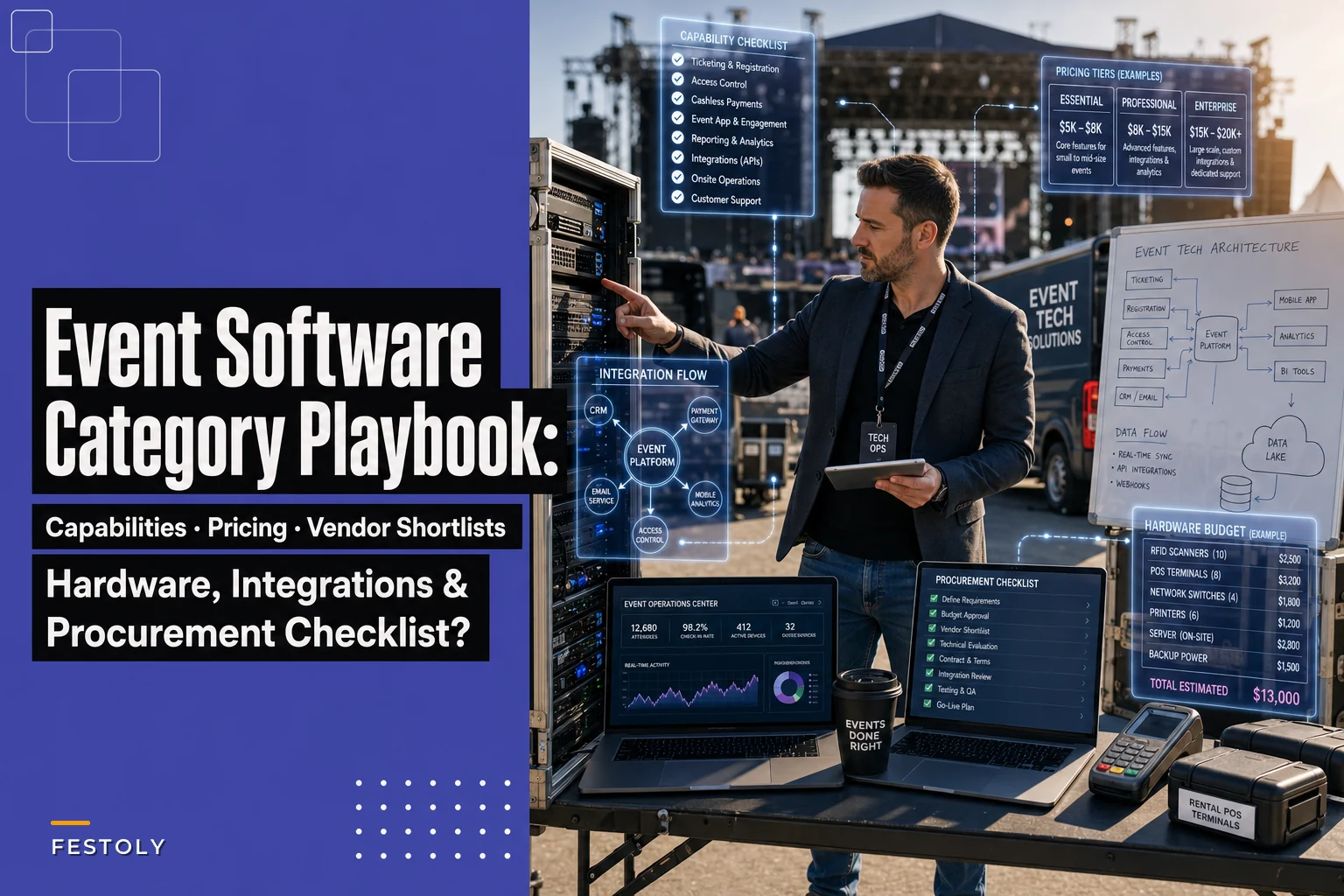

Most festival tech stacks in the 5k–20k range aren't built — they accumulate. You start with a ticketing platform because that's the obvious first need, then bolt on a scheduling app because the ticketing tool's session builder is garbage, then vendor coordination slides into a shared spreadsheet nobody fully trusts, and by show day you've got four tools each carrying a slightly different version of "how many people are on site right now."
The result is predictable. Your ops lead is refreshing three dashboards, your gate team is quoting a headcount that's 40 minutes stale, and nobody can answer the one question that actually matters when temperatures spike: how many people are in the sun-exposed zones right now, and is that number climbing?
This brief is about buying these categories in a way that avoids that mess. Not a features beauty contest — a practical map of what each software category has to do, how vendors price it, what it actually costs at 5k/10k/20k, and how the pieces need to connect so your data isn't fragmented when you need it most.
The four categories you're actually buying
Forget the marketing labels. At this event size, you're buying four functional blocks. Everything else is a feature of one of these.
-
Registration & ticketing — sells access, holds attendee identity, handles refunds and transfers, and is the source of truth for who's coming.
-
Scheduling & programming — builds the multi-stage timetable, manages speaker/artist logistics, and publishes to the attendee-facing app or site.
-
Vendor & exhibitor coordination — contracts, booth assignments, load-in windows, compliance docs, settlement.
-
Real-time operations & analytics — the live layer
scan data, headcount by zone, incident logging, and the dashboards your command post actually watches.
The mistake organizers make is treating these as one purchase. A single "all-in-one" platform will do two of these well and two badly, and you won't find out which two until you're 60 days out. What tends to work more reliably is picking a strong anchor for registration, being pragmatic about scheduling and vendor tools, and being genuinely picky about the real-time layer — because that's the one that fails you live, in front of 12,000 people.
Per-category capability checklists
Use these when you're on demos. Make the vendor show you the thing, not describe it.
Eliminate event chaos with Festoly.
Manage every aspect of your event seamlessly — from planning to execution.
- Centralized event scheduling
- Real-time attendee tracking
- Vendor & resource coordination
No credit card required
Registration & ticketing — what it must do
-
Tiered and timed ticket types (early bird, day passes, multi-day, group blocks) without manual workarounds
-
Named vs. transferable tickets with a clean transfer and resale flow you control
-
Refund and partial-refund handling that doesn't require a support ticket per case
-
API access to attendee records — not just a nightly CSV export
-
Offline scan capability with conflict resolution when devices reconnect
-
Custom fields at checkout (accessibility needs, dietary restrictions, vehicle passes) that flow downstream
-
Rate limiting and queue-during-onsale that survives a 10k drop in the first ten minutes
The offline scan point is the one people skip and regret. At 20k, your gates will lose connectivity at some point. If the platform can't scan offline and reconcile duplicates when it reconnects, you'll either stop the line or let people walk in un-scanned. Neither is acceptable.
Scheduling & programming — what it must do
-
Multi-track, multi-stage timetable with conflict detection (same speaker, two stages, overlapping slots)
-
Version control and a clear "published vs. draft" state so the public app doesn't show your working changes
-
Speaker and artist portal for bios, tech riders, and travel details
-
Room and stage capacity awareness tied to your queue and safety limits
-
Push-update to the attendee app when a slot moves — and it will move
-
Export to run-of-show format your stage managers actually use
Vendor & exhibitor coordination — what it must do
-
Application and jurying workflow with scoring
-
Booth and plot assignment tied to a map, not a text list
-
Document collection with expiry tracking (COI, food permits, fire marshal sign-offs)
-
Load-in and load-out window scheduling per vendor
-
Payment and settlement, including commission or percentage-of-sales models
-
A vendor-facing portal so you're not the switchboard for 200 exhibitors
The expiry tracking piece is quietly the most valuable feature in this category. A vendor's certificate of insurance that lapsed two days before the event is the kind of thing that gets caught at the gate by a fire marshal — not by you at a desk with time to fix it. Software that flags expiring docs 14 days out is worth more than most of the flashier features in this space.
Real-time operations & analytics — what it must do
-
Live scan-in and scan-out counts by gate and by zone
-
Occupancy estimates against defined zone capacities
-
Incident logging with location tagging and timestamp
-
Configurable alert thresholds (occupancy, gate throughput, weather-linked triggers)
-
A single ops dashboard that doesn't require five tabs
-
Historical replay so you can debrief what actually happened by the hour
This is where AI-assisted operational platforms earn their place — not as a gimmick, but because a human watching four dashboards will miss the moment a zone crosses 85% capacity while a shaded area sits half empty. A system that monitors thresholds continuously and pushes an alert ("Zone C occupancy climbing, 3 of 5 nearby shade structures underused") does something a tired ops lead at hour nine genuinely can't. That same live-monitoring logic ties directly into the heat-event triggers we covered in the 2026 heat wave playbook — the software should be firing those triggers automatically, not waiting for someone to notice.
How these tools price — read this before the demos
Pricing models in this space are deliberately hard to compare. Here's how to decode them.
| Model | How it's charged | Where it bites | Best fit |
|---|---|---|---|
| Per-ticket fee | % of face value + flat fee per ticket | Scales with revenue — painful on high-volume, low-price events | Registration platforms |
| Flat SaaS license | Annual or per-event fixed | Predictable, but you pay whether you sell 5k or 20k | Scheduling, vendor tools |
| Per-user / per-seat | Monthly per staff login | Sneaks up when your ops team grows for show week | Coordination, analytics |
| Module add-ons | Base + paid features | Base looks cheap; the features you need are all add-ons | "All-in-one" platforms |
| Hardware + software bundle | Scanners/kiosks bundled with license | Locks you in; hard to price-compare | On-site check-in vendors |
The trap is the per-ticket model on ticketing platforms. A 2.5% + $1.50 fee sounds small until you run 18,000 tickets at $40 — that's around $34k in platform fees before you've counted payment processing. Sometimes that's fine because the platform absorbs support and chargebacks. But at higher volumes, a flat-license ticketing tool can be dramatically cheaper, and organizers rarely run that comparison until year two.
For scheduling and vendor coordination, watch the module pricing. The base license covers the timetable; the speaker portal is an add-on; the mobile app is another add-on; API access is — surprise — an enterprise tier. Ask for the all-in quote for exactly the features on your checklist above.
Worked cost examples: 5k / 10k / 20k
These are illustrative ranges based on typical mid-market pricing. Your quotes will vary, but the shape holds.
5,000-attendee event (single or two-day, mixed ticket prices ~$25–45)
-
Registration (per-ticket ~2.5% + $1)
roughly $6k–$9k in platform fees
-
Scheduling tool (flat, per-event)
~$1.5k–$3k
-
Vendor coordination (flat + portal)
~$2k–$4k
-
Real-time analytics (base tier)
~$2k–$4k
-
Software total
roughly $12k–$20k
10,000-attendee event
-
Registration
~$12k–$18k in fees
-
Scheduling
~$3k–$5k
-
Vendor coordination
~$4k–$7k
-
Real-time analytics (mid tier, more zones)
~$5k–$8k
-
Software total
roughly $24k–$38k
20,000-attendee event (multi-day, multi-stage)
-
Registration
~$28k–$40k in fees — this is where a flat-license alternative starts making real sense
-
Scheduling
~$5k–$9k
-
Vendor coordination
~$7k–$12k
-
Real-time analytics (enterprise, full zone mapping + alerting)
~$10k–$18k
-
Software total
roughly $50k–$79k
Notice that registration fees dominate at scale while analytics stays a smaller line. Organizers often over-negotiate the cheap tools and under-scrutinize the ticketing fee that's quietly the biggest number on the page.
Representative vendors by category
Not endorsements — a starting shortlist of the kinds of tools that show up in this size range. Evaluate against your own checklists.
-
Registration & ticketing Eventbrite (small end), Tixr, See Tickets, Ticketmaster's outdoor/festival products, and flat-fee platforms like Ticket Tailor for high-volume low-price events.
-
Scheduling & programming Sched, Grenadine, and the programming modules inside broader platforms like Swapcard for hybrid components.
-
Vendor & exhibitor coordination Eventeny (strong on festival vendor management specifically), Marketplace/booth tools, and Momentus/Ungerboeck at the larger venue-operator end.
-
Real-time ops & analytics Purpose-built ops platforms with live occupancy and alerting, plus access-control vendors whose scanners feed a live dashboard.
The pattern worth noticing: the vendor-coordination category is where festival-specific tools genuinely beat generic conference software. A tool built for 200 food and craft vendors handles COIs, health permits, and percentage-of-sales settlement natively. A conference platform will make you rebuild all of that by hand.
Integration and data flows — the part that actually determines success
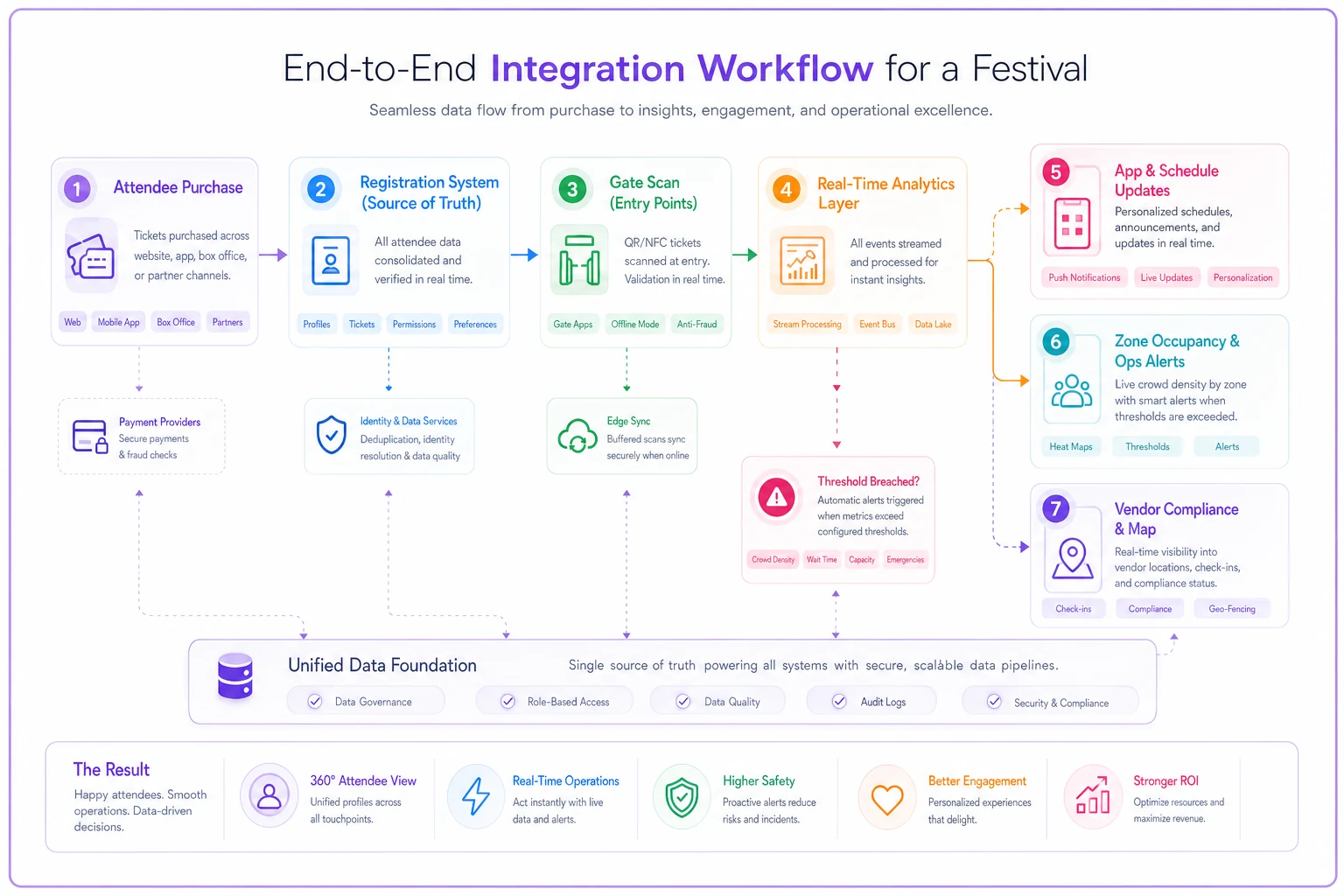
Here's the workflow that has to hold together end to end.
[Attendee Purchase] ↓ [Registration System — source of truth] ↙ ↘ [Gate Scan] [App / Schedule] ↓ [Real-Time Analytics Layer] ↓ ↓ [Zone Occupancy] [Ops Alerts] ↑ [Vendor Compliance Map]
An attendee buys a two-day pass. That record — with their accessibility flag and vehicle pass — lands in the registration system as the source of truth. On show day, their QR gets scanned at the gate; that scan event flows into the real-time analytics layer, incrementing gate count and zone occupancy. Meanwhile the scheduling system publishes a set change to the app, and the vendor system has already confirmed that Vendor #114's COI is valid and their booth is on plot D-7.
-
Registration → analytics scan events must stream in near-real-time, not batch overnight. This is the flow that gives you live headcount.
-
Registration → scheduling/app attendee identity and preferences flow to the app so personalized schedules and accessibility routing work.
-
Vendor → operations booth assignments and compliance status flow to the ops map so the command post sees which vendors are cleared and where.
The single most common integration failure is #1 running on a delay. If your "live" occupancy is a 30-minute batch, it's not live — it's history. When you evaluate the analytics layer, ask specifically about the latency of the scan feed and whether it's push (webhook/streaming) or pull (scheduled poll). Push wins every time at this scale.
When evaluating the analytics layer, ask specifically about the latency of the scan feed and whether it's push or pull.
Where an AI-assisted operational layer helps is in stitching these flows into decisions rather than raw numbers. Instead of three feeds you interpret manually, the system correlates them — occupancy rising in a zone, cross-referenced against weather triggers and available cooling capacity, surfacing one prioritized alert instead of three raw metrics. That's the difference between data and operational awareness.
Hardware budgeting: rent vs. buy
Scanners, kiosks, networking, comms. The rent-vs-buy math depends almost entirely on how often you run events.
Buy when: you run three or more events a year, or you run the same event annually and can amortize over multiple years. A rugged scanner that costs $400–$700 pays for itself across two or three events compared to renting.
Rent when: it's a one-off, or you need a large burst of gate hardware — 30+ scanners for a 20k event — that would otherwise sit in storage for the other 360 days.
-
Handheld scanners
buy ~$400–$700 each / rent ~$60–$120 per event per unit
-
Check-in kiosks
buy ~$1.2k–$2.5k / rent ~$200–$400 per event
-
On-site networking (temporary Wi-Fi and cellular failover for gates)
~$3k–$8k per event, almost always rented
-
Ruggedized tablets for ops leads
buy ~$600–$1k each
For a 20k event with 24 gate lanes, the scanner decision alone is a $10k–$17k purchase versus a $1.5k–$3k per-event rental. If it's a recurring festival, buying wins by year two. First-time event, rent and reassess.
One thing organizers consistently underestimate: the networking line. Your live analytics are worthless if the gates can't reliably reach the network. Budget for cellular failover at every scan point, and confirm your ticketing platform's offline mode actually works when that fails — which loops back to the capability checklist above.
Phased implementation timeline
Don't buy everything at once. A rough sequence that works for a first-time buildout, assuming a 6–9 month runway:
-
Months 6–5 Select and configure registration/ticketing. This is your anchor and needs the longest tail. Get onsale live early.
-
Months 5–4 Vendor coordination. Applications and jurying happen well before the event; you need this running to collect docs on time.
-
Months 4–3 Scheduling and programming. Build the timetable once your lineup is locked.
-
Months 3–2 Real-time analytics and integrations. Wire the scan feed, define zones and thresholds, test the dashboards.
-
Month 1 Hardware provisioning, staff training, and a full dry run of the live ops flow — including deliberately killing network at a test gate to confirm offline scan actually works.
The month 1 dry run is non-negotiable. The number of "live" dashboards that have never seen live data before show day is genuinely higher than it should be.
Procurement / RFP checklist
Send this, or a version of it, to every shortlisted vendor:
-
- [ ] Exact all-in quote for the features on our capability checklist — no "starting at" pricing
-
- [ ] Pricing model spelled out at our specific attendee volume (5k/10k/20k)
-
- [ ] API and webhook documentation, and confirmed scan-feed latency
-
- [ ] Offline capability and reconciliation behavior, in writing
-
- [ ] Data ownership and export terms — can we get our full data out, in what format, when
-
- [ ] Support model for show week (dedicated rep? response SLA? phone or ticket only?)
-
- [ ] Uptime history and behavior under load (10k concurrent onsale, peak gate throughput)
-
- [ ] Contract length and renewal terms — avoid multi-year lock-in on your first cycle
-
- [ ] Reference customers running events at our size
The support-during-show-week question separates serious vendors fast. A platform that only offers email support with a 24-hour SLA is fine for building your event and useless at 2pm on Saturday when scanning stops.
KPIs and alert thresholds — tied to real triggers
The analytics layer is only useful if it's watching the right numbers and firing at the right levels. A baseline set for a mid-sized festival:
-
Gate throughput alert if scans per minute drop below your planned rate for more than ~5 minutes — signals a jam or a device failure
-
Zone occupancy warning at ~80% of defined capacity, action threshold at ~90%, with the alert naming which adjacent zones have headroom
-
Un-scanned entries flag any gate where manual or override entries spike unexpectedly — signals scanner failure or a bypassed line
-
Vendor compliance hard flag on any active vendor with an expired or missing required document
-
Heat-linked triggers occupancy thresholds in sun-exposed zones set lower than shaded zones, tied directly to the temperature and heat-index triggers from your safety plan
That last one is where the whole stack proves its worth. When the heat index crosses a threshold, your system shouldn't just log the weather — it should recalculate sun-exposed zone limits, watch occupancy against the tightened numbers, and push an alert the moment a crowd starts building where there's no shade. The mechanics of those triggers and the cooling response they should kick off are laid out in the 2026 heat wave preparation playbook; the software's job is to enforce them automatically rather than relying on someone remembering to check.
A realistic scenario
A regional two-day music-and-food festival with around 11,000 attendees had been running a ticketing platform, a separate scheduling app, and vendor management in spreadsheets. Their live "headcount" on day one came from a staffer manually tallying gate clickers and radioing it to the command post every half hour.
For the next cycle they kept the ticketing platform but connected its scan feed via webhook into a real-time ops layer, mapped six zones with capacities, and moved vendor docs into a coordination tool with expiry tracking. The measurable changes were modest but real: gate headcount went from a ~30-minute manual estimate to a near-live number, and three vendors with lapsed COIs got flagged nine days out instead of at the gate. On the hotter of the two days, the occupancy alert on the main sun-exposed field fired about 20 minutes before the ops lead would have caught it manually — enough time to reopen a shaded overflow area and redirect the crowd before it became a medical situation.
Nothing dramatic. No revenue doubled. But the difference between a 30-minute-old headcount and a live one, on a hot afternoon with 11,000 people spread across six zones, is the difference between reacting and scrambling.
Bottom line for buyers
Buy the four categories as four decisions, not one. Be pragmatic about scheduling and vendor tools, ruthless about the registration fee that quietly dominates your costs at scale, and genuinely picky about the real-time layer — because that's the one you'll be staring at when something goes wrong. Lock down the scan-feed latency, confirm offline mode really works, and set your thresholds before show day, not during it.
Get those right and your stack stops being four disconnected tools and starts behaving like one system that can actually answer the questions that matter live.
Get those right and your stack stops being four disconnected tools and starts behaving like one system that can actually answer the questions that matter live.
Ready to elevate your event management?
Join 5,000+ event organizers using Festoly to save time, improve coordination, and deliver memorable experiences.