


The weather alert hit my phone at 5:47am. Hurricane-force winds heading straight for downtown, where we had 800 attendees expecting to walk into a tech conference in four hours. The venue coordinator wasn't answering. The AV company's trucks were already loaded. And my inbox was starting to fill with sponsor questions about whether we were still happening.
Most event teams freeze in these moments. Not because they lack experience, but because they're trying to process seventeen different variables while their phone explodes with messages. After running events through everything from power outages to missing keynote speakers, event contingency decision trees aren't about having perfect answers—they're about having a framework that gets you to good-enough decisions fast enough to actually implement them.
The vendor no-show scenario that breaks most events
Picture this: your registration team of six doesn't show up. Not delayed—completely MIA. Their company truck broke down three states away, or their flight got cancelled, or someone mixed up the dates. Doesn't matter why. You've got 45 minutes until doors open and zero check-in infrastructure.
What typically goes wrong: the event director starts calling backup vendors while the operations manager scrambles to find laptops. Meanwhile, the marketing lead is drafting emergency communications, and nobody's actually solving the immediate problem—how to get 800 people checked in without creating a mob scene.
Building your vendor contingency framework
T-minus 4+ hours: You still have options. Local vendors can mobilize, team members can cover basic functions, and you can restructure the flow.
T-minus 2 hours: You're in triage mode. Forget perfect replacements—focus on minimum viable solutions. Can three iPads replace a full registration system? Can boxed lunches replace a buffet?
Event in progress: Now you're doing live surgery. The decision tree here isn't about fixing—it's about minimizing visible impact while you patch things behind the scenes.
For each branch, you need pre-loaded decisions:
-
Who has spending authority to hire emergency replacements?
-
What's the maximum you'll pay for last-minute coverage?
-
Which functions can internal staff cover (and for how long)?
-
What's your communication trigger point for attendees?
The registration team no-show I mentioned? We ended up pulling two marketing coordinators, borrowed three iPads from sponsors, and used a shared Google Sheet for check-in. Not elegant, but 800 people got their badges. The decision tree told us to stop trying to replicate the original system and focus on basic throughput.
Weather decisions that save budgets and reputations
Weather contingencies feel straightforward until you're actually making them. The forecast shows 70% chance of storms. Do you cancel? Delay? Move indoors? Each choice cascades into twenty more decisions, and every hour you wait costs money and options.
Eliminate event chaos with Festoly.
Manage every aspect of your event seamlessly — from planning to execution.
- Centralized event scheduling
- Real-time attendee tracking
- Vendor & resource coordination
No credit card required
I watched an outdoor festival burn through $45,000 because they couldn't pull the trigger on their weather decision. They waited until noon to cancel an evening event, after vendors had already set up, staff was on-site, and food was prepped. Their decision tree had the right endpoints but no timing triggers.
The weather decision matrix
48 hours out: Monitor but don't act. Exception: hurricanes or blizzards with defined paths. Set communication checkpoints for major stakeholders.
24 hours out: If severe weather probability exceeds 60%, initiate preliminary moves. Alert vendors about possible changes, identify indoor alternatives, prepare contingency communications. Don't pull triggers, but remove all friction from pulling them later.
12 hours out: Decision point for major changes. Beyond this, you're not preventing costs—you're just choosing which costs to eat. A venue cancellation fee might be cheaper than weatherproofing everything.
6 hours out: Minor adjustments only. You can move things indoors, adjust schedules, or provide weather gear. But fundamental changes are off the table.
2 hours out: Safety decisions only. Either it's safe to proceed or it isn't. No middle ground.
Each threshold needs specific criteria. "Bad weather" is useless as a trigger. "Sustained winds over 35mph" or "lightning within 5 miles for 30+ minutes" gives your team something concrete to measure against.
Tech failures and the infrastructure you actually need
The main screen goes black during the keynote. The registration system crashes with 500 people in line. The live stream drops during the CEO's announcement. Tech failures hit different because they're visible, immediate, and everyone assumes you should have prevented them.
But operational reality looks like this: You can't prevent every tech failure. You can only control how fast you recover and how smooth that recovery looks to attendees. The decision tree for tech failures isn't about troubleshooting—it's about predetermined escalation paths.
The tech failure response framework
0-30 seconds: Acknowledge the issue visibly. Speaker makes a joke, MC fills time, or screens display a "technical difficulties" message. Don't leave people wondering if anyone noticed.
30-90 seconds: Implement your primary backup. Switch to backup laptop, move to handheld mics, activate mobile hotspot. This isn't debugging time—it's switching time.
90 seconds-3 minutes: If primary backup fails, go analog. Speaker proceeds without slides, registration switches to paper lists, streaming moves to recorded backup content.
3+ minutes: Communicate new reality. Tell people what's happening, how long it might take, and what they should do meanwhile. Offer break time, networking opportunity, or refreshments.
Each stage gets progressively less elegant but progressively more reliable. You're trading quality for certainty. A speaker without slides beats a frozen presentation. Paper registration beats a crashed system.
Communication scripts that actually work under pressure
Most crisis communication fails because teams try to write it during the crisis. You're stressed, information's incomplete, and seventeen people need different messages simultaneously. Pre-written scripts aren't about robotic responses—they're about freeing mental bandwidth for actual problem-solving.
Attendee version: Focus on their immediate needs. "Due to severe weather, doors will open 30 minutes late. The coffee station is available in the lobby." Don't explain why or how—just tell them what to do.
Vendor version: Include operational specifics. "Weather delay until 9:30am. Hold stations but don't set up consumables. Will confirm final timing by 8:45am." They need enough detail to adjust their operations.
Sponsor/VIP version: Add context and confidence. "Morning weather is forcing a 30-minute delay. This won't impact session content or networking time—we're compressing breaks to maintain value delivery. Your exhibition space remains unchanged."
Notice what's missing? Apologies, long explanations, and promises you might not keep. Crisis communication is about clarity, not comfort.
The stakeholder notification matrix
| Stakeholder | Trigger Point | Channel | Message Focus |
|---|---|---|---|
| Attendees | Any delay >15 min | App push + email | What to do now |
| Speakers | Any schedule change | Direct call/text | Their specific timing |
| Vendors | 2hrs before impact | Email + text | Operational changes |
| Sponsors | Major changes only | Phone call | Business impact |
| Venue | Immediately | Direct contact | Liability/safety issues |
| Media | Post-decision only | Official statement |
The brutal truth about stakeholder communication: most people don't need to know everything. Your catering team doesn't need weather radar analysis—they need to know if lunch moves inside. Attendees don't need vendor drama—they need to know if sessions are running on time.
Building decision trees that people actually use
Teams ignore beautiful decision trees during actual crises. I've learned that usability beats completeness. A simple framework people remember beats a complex one they have to look up.
Your decision trees should follow this format:
Trigger: Specific, measurable condition (not "tech problems" but "keynote presentation system fails")
Decision point: Binary choice with clear criteria ("Can we fix in under 2 minutes?")
Action A: If yes, specific steps with owner assigned
Action B: If no, specific alternate path with owner assigned
Escalation: When to involve higher authority (usually time or cost based)
That's it. No complex flowcharts, no nested conditions, no "it depends" branches. When adrenaline's pumping and phones are ringing, simple beats sophisticated.
Who owns what when everything's on fire
Weather calls: Operations Director decides, Event Director approves if cost >$10k
Vendor issues: Vendor Manager decides for non-critical, Operations Director for critical
Tech failures: Tech Lead gets 3 minutes to fix, then Operations Director takes over
Safety issues: Security Lead decides, period. No committee, no discussion.
Financial thresholds: Anyone can spend up to $1k in crisis, Ops Director up to $10k, Event Director unlimited
These aren't suggestions—they're pre-made decisions that remove friction when seconds matter.
Testing your frameworks before you need them
Running tabletop exercises sounds great until you realize nobody has time for disaster roleplaying. Instead, build testing into your regular operations. Next team meeting, kill the projector five minutes in. See how long it takes someone to grab a backup laptop. During your venue walkthrough, ask "what if the loading dock is blocked?" Make these micro-tests part of normal prep, not special sessions.
The patterns you'll discover:
-
People freeze without clear ownership
-
First solutions are usually overcomplicated
-
Communication takes 3x longer than expected
-
Simple backups work better than sophisticated ones
Turn tabletop exercises into micro-tests during routine prep to build muscle memory.
Make these micro-tests part of normal prep, not special sessions.
Integrating automation into crisis response
The challenge with event contingency planning isn't creating the decision trees—it's maintaining them and ensuring everyone can access them when chaos hits. AI-powered operational software changes the game here, not by making decisions for you, but by surfacing the right information at the right moment.
Modern event operations platforms monitor multiple data streams—weather APIs, vendor check-in status, registration system health, social media mentions—and automatically trigger your predefined escalation protocols. When the system detects sustained winds exceeding your threshold, it pulls up the relevant decision tree, shows you which vendors are on-site, calculates financial impact of various choices, and pre-drafts stakeholder communications based on your templates.
Here's a quick visual of the workflow:
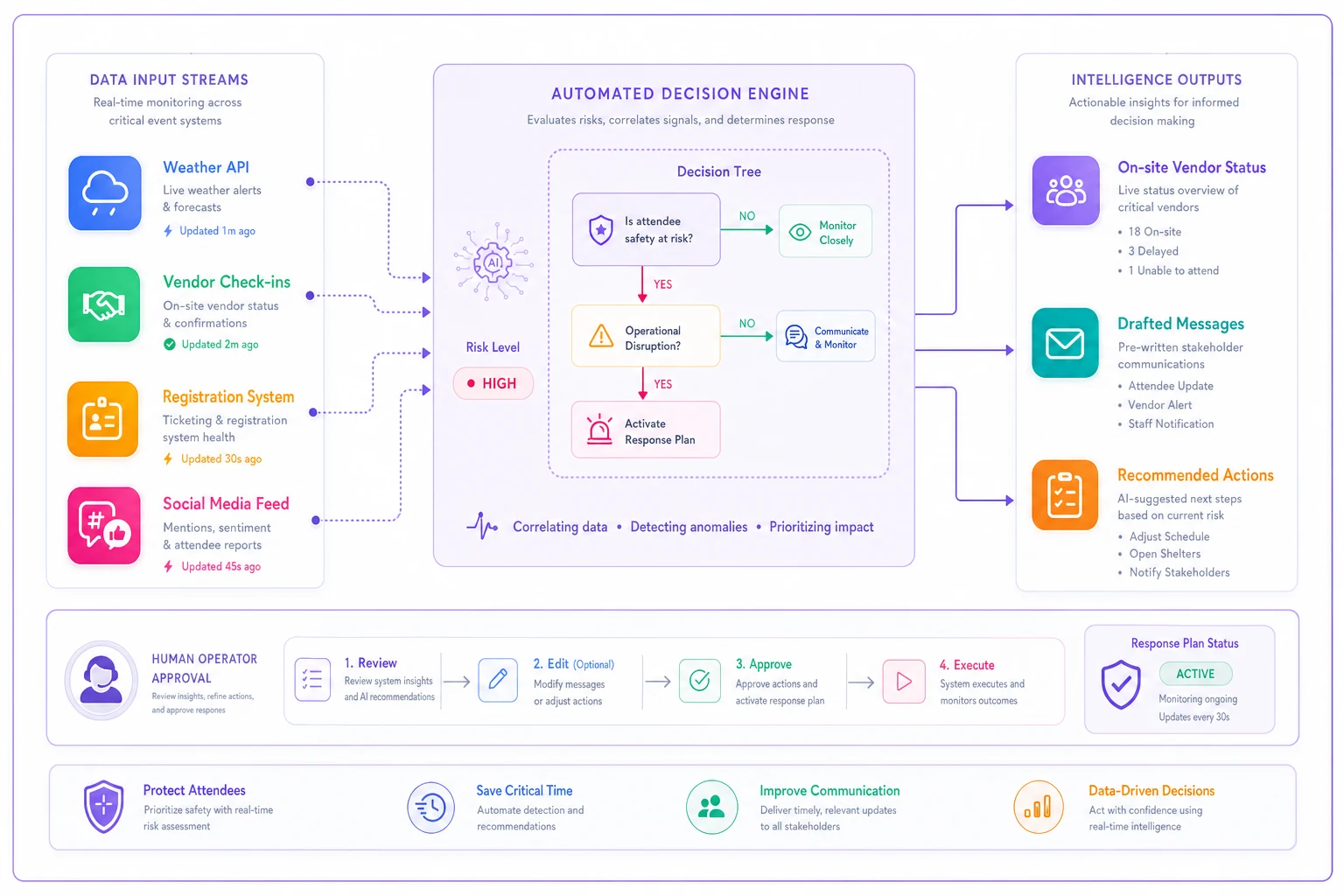
The real value comes from pattern learning. These systems identify which vendors consistently show up late, which weather patterns actually impact attendance, and which tech failures repeat. This institutional knowledge usually walks out the door when experienced staff leave. AI automation captures it and makes it available to everyone.
But automation can't replace human judgment in crisis moments. What it does is eliminate the scrambling for information, the frantic searching for phone numbers, the trying to remember what we did last time. It handles the operational overhead so humans can focus on actual decision-making.
What this actually looks like in practice
Let me paint you the full picture of a weather-related crisis with proper decision trees in place:
5:47am: Weather alert triggers automated monitoring. System pulls historical data from similar weather events, showing 73% still attended last time conditions were comparable.
6:15am: Operations Director gets automated summary: "Decision point in 45 minutes. Indoor backup venue available until 7:30am for $3,500. Current vendor status: 4 of 6 critical vendors confirmed on-site."
7:00am: Hit the 6-hour threshold. Decision tree says assess and communicate. Team makes the call to proceed but move two outdoor sessions inside.
7:15am: Communications go out through predetermined channels. Attendees get push notification about indoor changes. Vendors get specific relocation instructions. Sponsors get personal calls about booth adjustments.
8:30am: Weather clears earlier than expected. Decision tree says no changes under 2 hours from start. Stay the course with indoor adjustments.
Post-event: System captures all decisions, timings, and outcomes. Next weather threat, you start with better data.
The difference isn't that you made perfect decisions. It's that you made consistent decisions quickly enough to execute them properly. Nobody stood around debating. Nobody wondered who should call whom. Nobody scrambled for backup plans.
The frameworks you need tomorrow morning
Stop trying to plan for every possible crisis. Instead, build simple decision trees for your five most likely disruptions:
-
Weather delays or cancellations
-
Registration system failures
-
Keynote speaker no-shows
-
Vendor/catering failures
-
Power/internet outages
For each one, define:
-
Clear trigger points with specific thresholds
-
Binary decision points (not complex flowcharts)
-
Pre-assigned ownership for each decision
-
Time-based escalation paths
-
Pre-written communications for three stakeholder groups
Keep these frameworks simple enough to remember under stress. Test them in small ways during regular operations. Update them based on actual incidents, not theoretical scenarios.
Event crisis management doesn't have perfect responses. But good-enough responses executed quickly beat perfect plans delivered too late. Your decision trees aren't about preventing problems—they're about responding fast enough that attendees barely notice the scramble happening behind the scenes.
That hurricane warning I mentioned at the start? We made the call to delay by two hours, moved registration inside, and condensed the morning schedule. Not elegant, but decisive. By noon, attendees were commenting on how smoothly we handled the weather. They never saw the seventeen micro-decisions we made between 5:47am and 8:00am, because we had a framework that told us exactly what to decide and when.
Build your frameworks now, while you're calm and can think clearly. Because when crisis hits, you won't have time to design decision trees—you'll only have time to follow them.
Ready to elevate your event management?
Join 5,000+ event organizers using Festoly to save time, improve coordination, and deliver memorable experiences.