

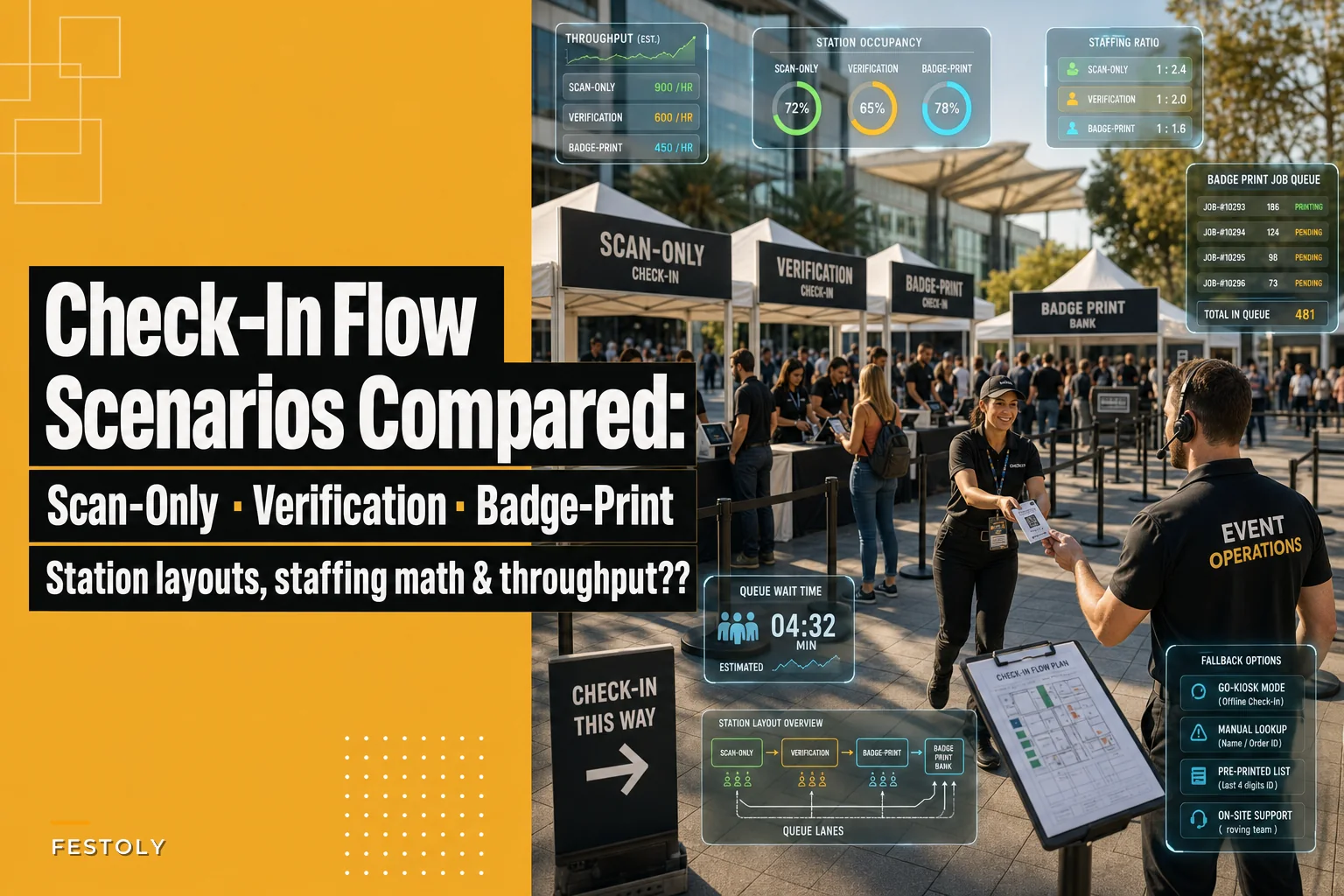
Most check-in problems don't show up in the plan. They show up in the first 20 minutes after doors open, when 400 people arrive in a 15-minute window and your line snakes past the coat check and out the door. By then it's too late to redesign anything. You're just managing the damage.
The three check-in models most organizers actually use — scan-only, verification, and badge-print — behave very differently under pressure. They don't just differ in cost. They differ in how they fail. And the failure mode is what you should be planning around, not the average speed on a quiet morning.
This is a side-by-side look at all three: real per-person timing, station layouts, staffing ratios, and what happens when the surge hits. I'll also cover fallback plans for each, because every one of these models has a specific way of collapsing that you can prevent if you see it coming.
The three models, side by side
Start with the numbers that matter, because everything downstream depends on per-person processing time. These are realistic ranges from actual door operations, not lab conditions.
| Model | Time per attendee | Staff per lane | Best event size | Main failure mode |
|---|---|---|---|---|
| Scan-only | 4–8 seconds | 1 (or 0 with self-scan) | Any size, especially 1,000+ | Bad scans / dead battery on phones |
| ID verification | 20–45 seconds | 1–2 | 100–800, controlled-access | Manual lookup bottleneck |
| Badge printing | 25–60 seconds | 1 + shared printer pool | 200–2,000, multi-day | Printer jams, name spelling fixes |
The gap between scan-only and badge-print is enormous — roughly a 10x difference in per-person time. That's the single most important thing to internalize. A model that takes 6 seconds per person and one that takes 45 seconds per person are not "both check-in." They are completely different throughput animals, and you cannot swap one for the other at the last minute without adding lanes.
Here's the math that trips people up. A single scan-only lane at 6 seconds per person clears about 600 people an hour in theory, maybe 450–500 in practice once you account for people fumbling for their phone. A single badge-print lane at 40 seconds clears about 90 people an hour, realistically closer to 70 once someone needs a spelling correction. So one badge lane does roughly the work of one-sixth of a scan lane. If you budgeted the same number of lanes for both, you built a disaster.
Scan-only: fast, cheap, and brittle in one specific way
Scan-only is what it sounds like. Attendee shows a QR code — email, wallet pass, printed ticket — staff or a kiosk scans it, green light, they walk in. This is the throughput champion and it's the right default for anything over about a thousand people.
Eliminate event chaos with Festoly.
Manage every aspect of your event seamlessly — from planning to execution.
- Centralized event scheduling
- Real-time attendee tracking
- Vendor & resource coordination
No credit card required
The layout is simple: shallow lanes, no tables needed if you're using handheld scanners or floor-standing kiosks. You want people moving through, not stopping. A common mistake is putting scan-only staff behind a long table — that creates a psychological "stop" point that slows the whole thing down. Get rid of the table. Put staff standing with a lanyard scanner and let the crowd flow past.
Staffing ratio: one scanner per lane, plus one floater per 4–5 lanes to handle the inevitable "my code won't scan" cases. That floater is the whole game. Without them, one bad scan stalls an entire lane while everyone behind waits.
Position the floater centrally so they can quickly reach any stalled lane without crossing through the queue.
Where scan-only breaks: dead phones, screen brightness too low to read, screenshots of screenshots that won't render, and attendees who never downloaded their ticket. In real operations this tends to run around 3–6% of arrivals. Sounds small until you realize that at a 2,000-person event, that's 60–120 people who need manual handling. If you don't have a dedicated help lane for them, they clog your main lanes and your fast model suddenly isn't fast.
When scan-only makes sense: large events, general admission, anything where speed at the door beats everything else, and any situation where you've got clean pre-registration data.
When it's a bad idea: high-security events where you actually need to confirm identity, or events where a meaningful share of your audience is likely to arrive without a working code.
ID verification: slow by design, and that's fine if you plan for it
Verification adds a human check — matching a name to an ID, confirming against a list, checking age or credentials. This is the model for controlled-access events: industry-only trade sections, ticketed events with strict transfer rules, anything with a compliance angle.
The problem is that verification is inherently a stop-and-read task, and humans are slow at it. Twenty to forty-five seconds sounds trivial until you multiply it. A 500-person verification event needs real lane math or you'll have a 40-minute queue at peak.
The layout here does need tables, because staff are handling documents. Give each lane enough table depth that the ID and the device aren't fighting for space. And critically — separate the lookup from the decision. The slowest verification setups make one person search the attendee list, verify the ID, and handle exceptions all at once. Split it: a searchable digital list that returns a result in a second or two lets staff spend their time on the actual eyeball check instead of scrolling.
This is one area where a decent check-in platform earns its keep. When the attendee list is searchable by partial name, phone, or a scanned code, and syncs live across every lane, you cut the lookup portion of verification from maybe 15 seconds of scrolling down to a couple seconds. That doesn't make verification "fast," but it removes the compounding delay that turns a 25-second task into a 50-second one during a rush. Manual list-searching is the hidden tax inside verification, and eliminating it is the highest-leverage fix available.
Staffing ratio: plan 1–2 staff per lane and more lanes than you think. If your peak arrival is 300 people in 20 minutes and each takes 30 seconds, you need at least 8 lanes just to break even, and you should run 10 to leave headroom.
Badge printing: the multi-day workhorse with a jam problem
Badge-print check-in produces a physical badge on the spot — usually thermal-printed, sometimes with a photo. This is standard for conferences, trade shows, and multi-day events where the badge is also the access credential and the networking tool.
Badge printing is slow for two reasons people underestimate. First, the print itself takes several seconds. Second, and worse, is the human editing loop: "That's spelled wrong," "My title changed," "Can you add my company?" Every one of those turns a 25-second interaction into a 90-second one, and they cluster unpredictably.
The layout that works is a shared printer pool, not one printer per lane. Multiple check-in stations feed a bank of printers, and a runner hands badges to attendees as they finish. This decouples the slow print step from the fast check-in step. When each lane has its own printer, a single jam kills that lane entirely. With a pool, one dead printer just means the others pick up the slack.
Here's a quick diagram of the recommended flow.
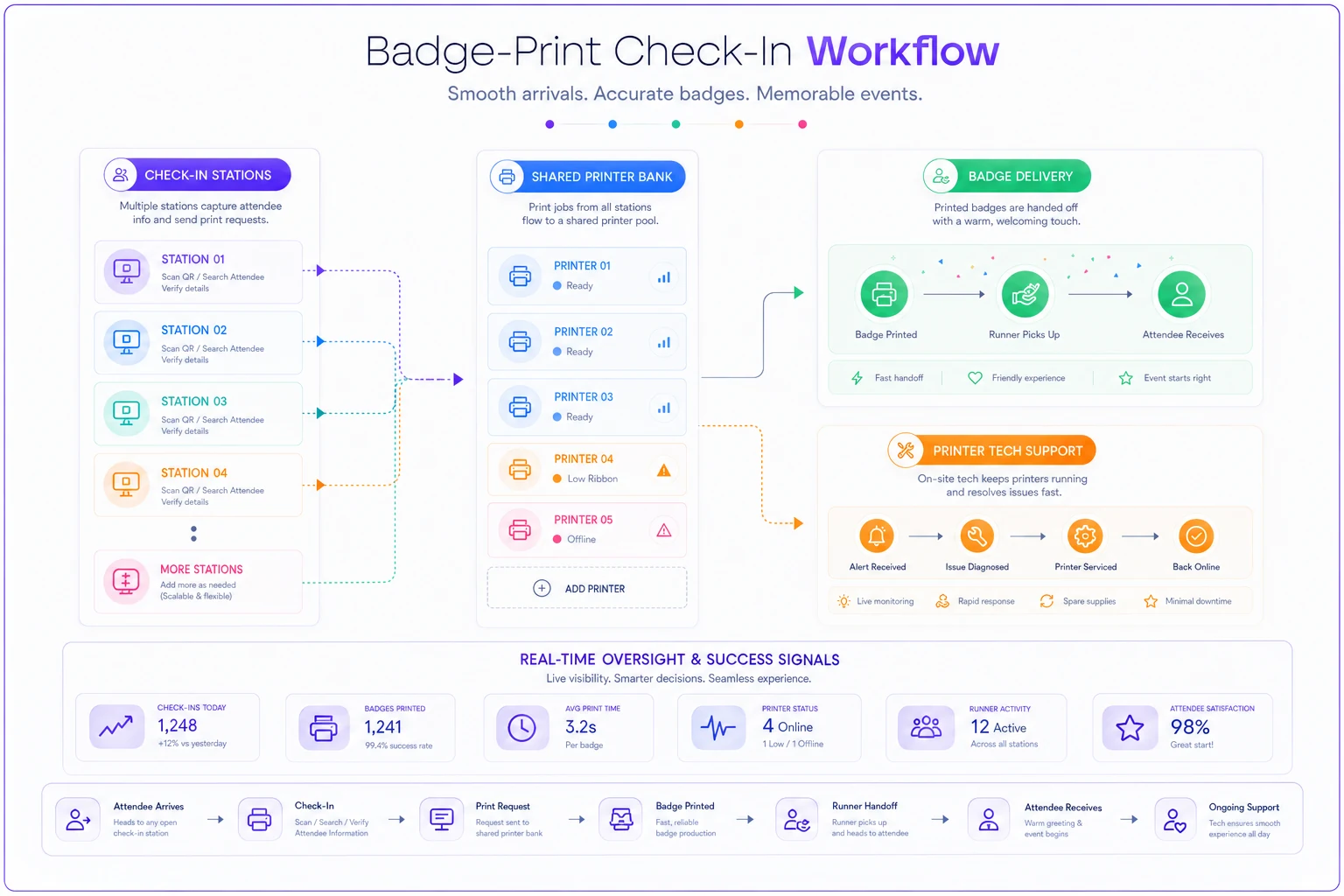
Staffing ratio: one person per check-in station, plus one badge runner per 3–4 stations, plus one dedicated printer tech for any setup over about six printers. That printer tech role gets cut from budgets constantly, and it's a mistake. Thermal printers jam, run out of stock, and overheat during surges. Someone needs to own them.
To illustrate the difference layout makes: a two-day regional conference expecting around 900 attendees ran self-service badge kiosks the first year — six kiosks, no runners, one printer each. Peak morning arrival hit hard and the queue ran roughly 35 minutes because every jammed kiosk took itself offline. Second year, same headcount, they switched to eight staffed stations feeding a shared bank of five printers with two runners. Peak wait dropped to under 10 minutes. Same number of people, same number of machines, better throughput — purely from decoupling the print step from the check-in step.
Matching the model to your event size
There's no universally correct model. The right one depends on your size, your access rules, and your surge profile.
-
Estimate your peak arrival window, not your total headcount. A 1,000-person event where everyone arrives across three hours is easy. A 400-person event where everyone shows up in the 20 minutes before a keynote is brutal. Peak-window volume drives everything.
-
Divide peak arrivals by your per-person time to get required lanes. Use the realistic numbers from the table, not the theoretical best case.
-
Add 25–30% lane headroom. Something always goes wrong. A lane goes down, a scanner dies, a staff member is late. Headroom is what keeps a small problem from becoming a visible queue.
-
Decide whether you actually need verification or badges. A lot of events default to badge printing out of habit when scan-only would clear the floor in a third of the time. Ask what the badge is for. If it's just proof of entry, a scan is enough.
-
Build a fallback lane for every model — see below.
Build a fallback lane for every model — see below.
Fallback plans, one per model
Every model has a specific collapse mode. Plan the fallback for that exact failure, not a generic "we'll figure it out."
-
Scan-only fallback a manual help lane staffed by someone who can look up an attendee by name and admit them without a code. This absorbs the dead-phone and no-code crowd so they never hit your main lanes.
-
Verification fallback a pre-printed will-call list on paper. If your list-lookup system goes down mid-event, verification staff can still work off paper for people who registered in advance. Slower, but it keeps the line moving.
-
Badge-print fallback a stack of blank badges and a couple of thick markers. When all printers jam at once — and during a surge they can — handwriting badges for 15 minutes beats stopping the line entirely. Ugly, but it works.
The organizers who stay calm at the door are the ones who decided in advance what "the printers all died" looks like. The ones who panic assumed it wouldn't happen.
A quick pre-door checklist
Run this the morning of, before the first attendee arrives:
-
- [ ] Every scanner and kiosk powered, charged, and test-scanned with a real ticket
-
- [ ] Attendee list synced and searchable at every lane
-
- [ ] Floater and runner roles assigned to named people, not "whoever's free"
-
- [ ] Printer stock loaded and a full backup roll per printer within arm's reach
-
- [ ] Manual/help lane set up and signed clearly
-
- [ ] Paper will-call backup printed and at the front
-
- [ ] Blank badges and markers staged near the printer pool
-
- [ ] Someone owns the printers; someone owns the list; everyone knows who
Someone owns the printers; someone owns the list; everyone knows who
The thing most people get wrong
The biggest mistake in check-in planning isn't picking the wrong model.
It's picking a model based on the average experience instead of the peak experience. Every one of these systems works fine when three people trickle in per minute. They all differ enormously when 200 people show up in a five-minute burst because a shuttle just unloaded.
The biggest mistake in check-in planning isn't picking the wrong model.
It's picking a model based on the average experience instead of the peak experience. Every one of these systems works fine when three people trickle in per minute. They all differ enormously when 200 people show up in a five-minute burst because a shuttle just unloaded.
Ready to elevate your event management?
Join 5,000+ event organizers using Festoly to save time, improve coordination, and deliver memorable experiences.